EducationSoftwareStrategy.com
StrategyCommunity

Knowledge Base

Product

Community

Knowledge Base

TopicsBrowse ArticlesDeveloper Zone

Product

Download SoftwareProduct DocumentationSecurity Hub

Education

Tutorial VideosSolution GalleryEducation courses

Community

GuidelinesGrandmastersEvents
x_social-icon_white.svglinkedin_social-icon_white.svg
Strategy logoCommunity

© Strategy Inc. All Rights Reserved.

LegalTerms of UsePrivacy Policy
  1. Home
  2. Topics

KB31373: The option to point a grid to an Intelligent Cube appears disabled in MicroStrategy Developer


Stefan Zepeda

Salesforce Solutions Architect • Strategy


This article describes why the point a grid to Intelligent Cube option can be disabled in MicroStrategy

SYMPTOM:
The option to point a grid to an Intelligent Cube appears disabled, while other options such as "Convert Grid to Intelligent Cube" appear available.
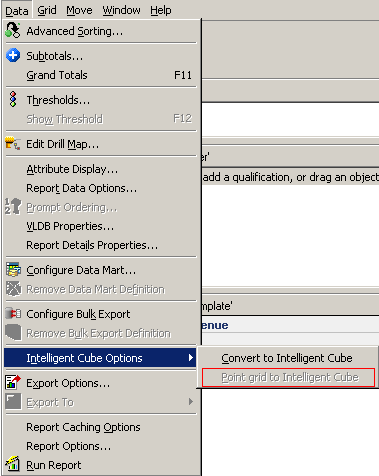
ka02R000000kWyMQAU_0EM440000002EIq.jpeg

 
CAUSE:
The report on which the action is being performed is a "Standard" report, only OLAP reports can be pointed to Intelligent Cubes.
 
ACTION:
Follow one of the options listed below to achieve the desired operation: 
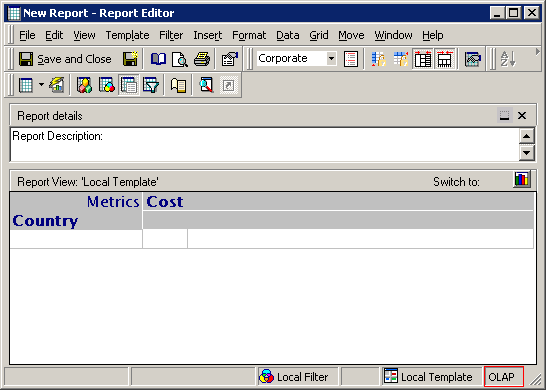
  • Perform an OLAP operation on the report such as removing an object and placing it on the report objects window or adding a derived metric. The report should change from "Standard" to "OLAP", the change will be displayed in the lower left corner of the report window as shown:
ka02R000000kWyMQAU_0EM440000002EIg.jpeg
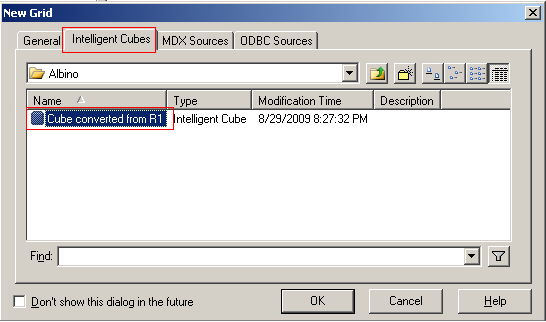
  • When creating a new report, set the new report to be pointed by default to an Intelligent cube, by selecting the Intelligent Cube tab in the report creation dialog as shown below:
ka02R000000kWyMQAU_0EM440000002EIo.jpeg

Comment

0 comments

Details

Knowledge Article

Published:

April 12, 2017

Last Updated:

April 12, 2017