SYMPTOM:
After copying the DSNs from Windows 32-bit environment to Windows 64-bit environment, the error message “Data source name not found and no default driver specified” is generated when trying to connect to these DSNs through DB Query Tool or when executing any report through Strategy Developer in the new environment
CAUSE:
Since the DSNs are copied from one environment to another by exporting the HKEY_LOCAL_MACHINE\SOFTWARE\ODBC\ODBC.INI registry key and merging it in the new environment, one of the causes of this error is that the registry key got corrupted during migration.
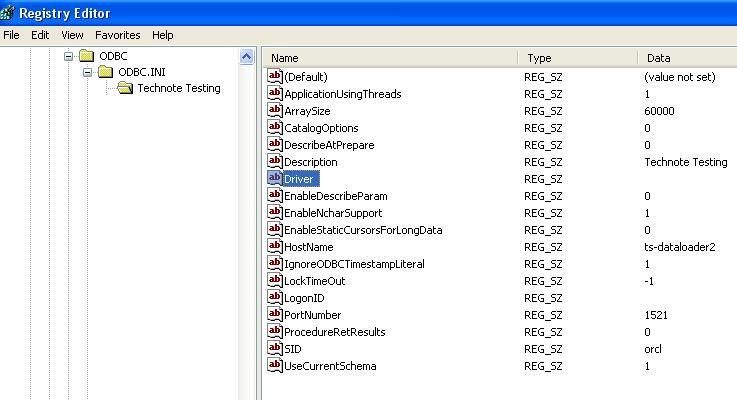
To confirm that the registry key got corrupted in the new environment, select the registry key “HKEY_LOCAL_MACHINE\SOFTWARE\ODBC\ODBC.INI\{DSN Name}” in the Registry Editor and check the data for the Value name “Driver”. It would be blank instead of displaying the path of the driver DLL on the local machine, as shown below:
ACTION:
It is strongly recommended to create the DSNs through Connectivity Configuration Wizard in the new environment to resolve this issue.
Registry Modification Warning:
Modifying registry values incorrectly may cause serious, system-wide problems that may require the re-installation of Microsoft Windows. Any edit of the registry is done at the user's own risk. Since these are user-initiated changes, they are not covered by any Strategy warranty. If using Microsoft Windows, the user should backup the registry and/ or update an Emergency Repair Disk prior to alterations.
