EducationSoftwareStrategy.com
StrategyCommunity

Knowledge Base

Product

Community

Knowledge Base

TopicsBrowse ArticlesDeveloper Zone

Product

Download SoftwareProduct DocumentationSecurity Hub

Education

Tutorial VideosSolution GalleryEducation courses

Community

GuidelinesGrandmastersEvents
x_social-icon_white.svglinkedin_social-icon_white.svg
Strategy logoCommunity

© Strategy Inc. All Rights Reserved.

LegalTerms of UsePrivacy Policy
  1. Home
  2. Topics

KB313758: The Host Name is used as the Port Number when creating a SQL Server DSN in MicroStrategy Connectivity Wizard 10.2 - 10.5


Community Admin

• Strategy


The issue described in this document has been classified as a defect by MicroStrategy.  The issue occurs in MicroStrategy Connectivity Wizard 10.2 - 10.5.  A solution/code fix is available from MicroStrategy 10.7.  A workaround is also provided in this document.

SUMMARY:
The issue described in this document has been classified as a defect by Strategy.  The issue occurs in Strategy Connectivity Wizard 10.2 - 10.5.  A solution/code fix is available from Strategy 10.7.  A workaround is also provided in this document.
 
DESCRIPTION:
When creating a SQL Server DSN in Strategy Connectivity Wizard 10.2 - 10.5, the value entered in the Host Name field is also used as the value for the Port Number if the value in the Host Name field is numeric.
 
Values entered in Connectivity Wizard:
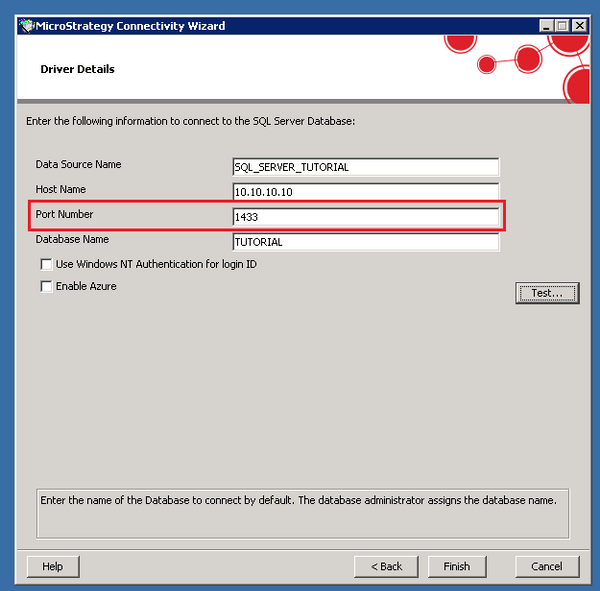
ka04W000000OhiWQAS_0EM440000002C0i.jpeg

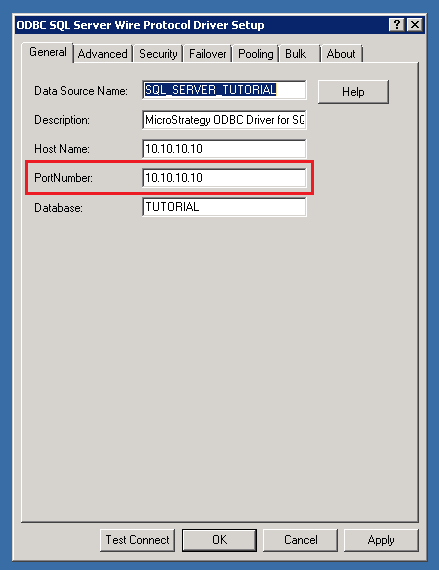
Values seen in ODBC Administrator:

ka04W000000OhiWQAS_0EM440000002C0k.jpeg

 
This may result in ODBC errors such as the following:


2016-10-18 20:56:33.316 [HOST:][SERVER:][PID:6820][THR:7724][Database Classes][Error] Failed to connect to data source. Error message: Connect failed. 
Error type: Odbc error. Odbc operation attempted: SQLDriverConnect. [HY000:2702: on SQLHANDLE] [Strategy][ODBC SQL Server Wire Protocol driver]Number contains an invalid character: 10.10.10.10 Connection String: DSN=...;UID=...;.

 
CAUSE:
This is an identified defect in Strategy Connectivity Wizard 10.2 - 10.5.
 
ACTION:
The issue has been solved in Strategy 10.7. Upgrade to that version or newer to benefit from the fix.
 
WORKAROUND:
Edit the DSN in Windows ODBC Administrator and enter the correct value in the Port Number field.
On UNIX/Linux machines, the odbc.ini file can be altered to add the correct port number.


Comment

0 comments

Details

Knowledge Article

Published:

April 19, 2017

Last Updated:

April 19, 2017