Introduction:
Strategy Mobile supports three authentication modes that are used by the user to log in to the Mobile Application:

Anonymous Authentication:
Anonymous authentication gives users access to your mobile application without prompting them for a user name or password. By default, the IUSR account, is used to allow anonymous access.
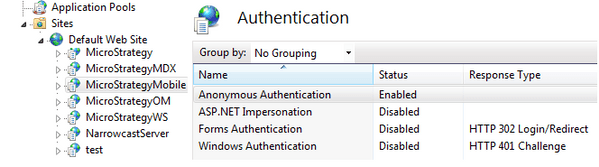
By default, IIS 7 uses Anonymous authentication. Anonymous authentication must be disabled for any Web site, Web application, or Web service that other authentication methods such as Basic or Windows authentication are being used.
In order to configure the Strategy Mobile application for Anonymous Authentication, Ensure that Standard is selected as the default Authentication mode for the Intelligence Server in the WebAdmin Page and the IUSR account is granted full permissions to the Strategy Mobile Virtual Directory.

Basic Authentication:
For Siteminder on Mobile please refer to KB33502
For Tivoli on Mobile please refer to KB39205
For Ping Federate please refer to KB219049
Windows Authentication:
Please refer to KB205622 for more information on how to setup windows authentication.
Integrated Authentication:
Please refer to KB19580, for more information on how to setup Integrated authentication.
