EducationSoftwareStrategy.com
StrategyCommunity

Knowledge Base

Product

Community

Knowledge Base

TopicsBrowse ArticlesDeveloper Zone

Product

Download SoftwareProduct DocumentationSecurity Hub

Education

Tutorial VideosSolution GalleryEducation courses

Community

GuidelinesGrandmastersEvents
x_social-icon_white.svglinkedin_social-icon_white.svg
Strategy logoCommunity

© Strategy Inc. All Rights Reserved.

LegalTerms of UsePrivacy Policy
  1. Home
  2. Topics

KB313860: How to rename "Total" in VI dashboard in MicroStrategy Web 10.x?


Community Admin

• Strategy


How to rename "Total" in VI dashboard in MicroStrategy Web 10.x?

While there is not a method to rename the "Total" that comes integrated in Strategy Web 10.x, a workaround is available below:
STEPS TO FOLLOW:
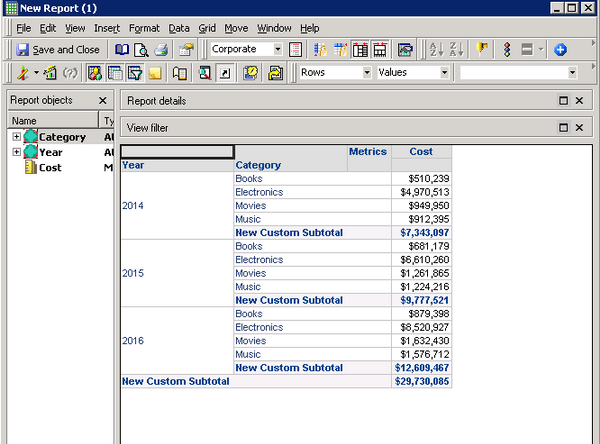
1. Create a custom subtotal with desired name in dataset report.
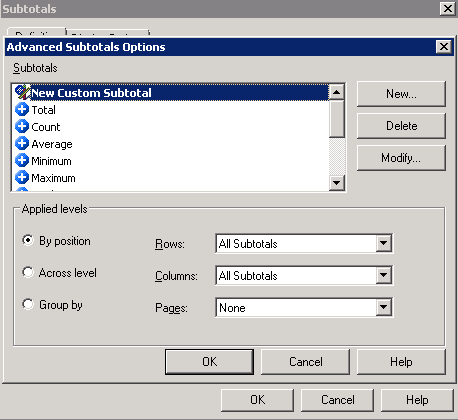
ka04W000000OftFQAS_0EM4400000025SH.jpeg


ka04W000000OftFQAS_0EM4400000025SD.jpeg

 2. Right mouse click on the report and choose "Create dashboard"
 3. See the total is renamed.
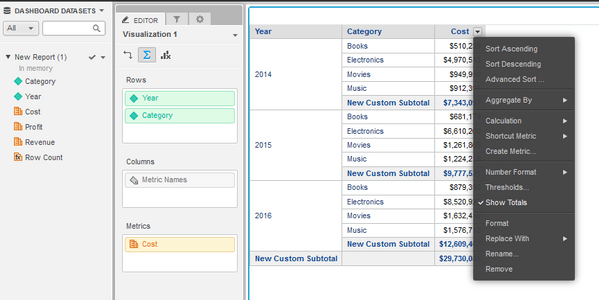
ka04W000000OftFQAS_0EM4400000025SF.jpeg

 
Note: The workaround won't take effect if creating a new sheet.


Comment

0 comments

Details

Knowledge Article

Published:

June 1, 2017

Last Updated:

June 1, 2017