EducationSoftwareStrategy.com
StrategyCommunity

Knowledge Base

Product

Community

Knowledge Base

TopicsBrowse ArticlesDeveloper Zone

Product

Download SoftwareProduct DocumentationSecurity Hub

Education

Tutorial VideosSolution GalleryEducation courses

Community

GuidelinesGrandmastersEvents
x_social-icon_white.svglinkedin_social-icon_white.svg
Strategy logoCommunity

© Strategy Inc. All Rights Reserved.

LegalTerms of UsePrivacy Policy
  1. Home
  2. Topics

KB314054: Color/font/style/size formatting of Radio list control does not take effect on iPad in MicroStrategy Mobile 10.4 and newer


Community Admin

• Strategy


Color/font/style/size formatting of Radio list control does not take effect on iPad in MicroStrategy Mobile 10.4 and newer

REPRODUCTION STEPS:
1. Create a transaction services document with Radio List control style
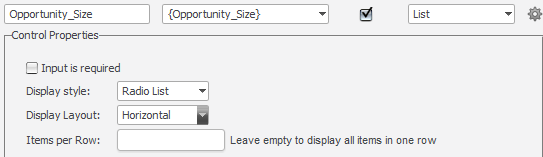
ka04W000000OaemQAC_0EM4400000029nh.jpeg

2. In Properties and formatting, change font to Comic Sans MS, Style to Italic, Size to 12, Color to green.
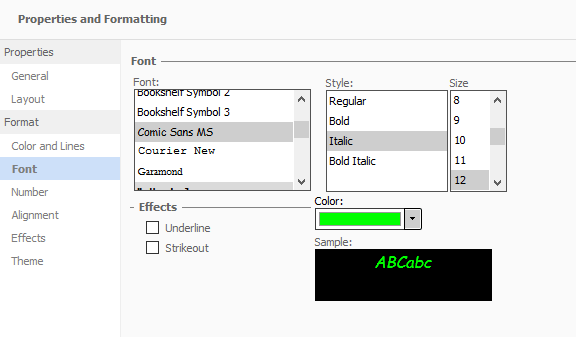
ka04W000000OaemQAC_0EM4400000029nW.jpeg

3. Run the document in presentation mode in web. See desired formatting change.

ka04W000000OaemQAC_0EM4400000029nY.jpeg

4. Run the document on iPad. Note that Radio input texts are not formatted.



ka04W000000OaemQAC_0EM4400000029nX.jpeg

  
CAUSE:
This is a known issue of Strategy Mobile 10.4 and newer
 
ACTION:
Strategy will continue to investigate and post updates as soon as they are available.
KB314054


Comment

0 comments

Details

Knowledge Article

Published:

May 5, 2017

Last Updated:

December 30, 2018