SUMMARY:
Although Strategy Command Manager has several built in commands to modify both configuration level objects and project level folders, neither command is currently appropriate to modify the User Manager object under administration.
SYMPTOM:
Under the Project Source Administration Tab, there are several configuration objects, including the User Manager object.

Strategy sets the ACLs of several built in groups as part of a default installation. Users may wish to add or modify these ACLs via our Strategy Command Manager tool.

Strategy Command Manager includes an outline regarding its Add Configuration ACE command.

Please note however, that the only valid objects for this statement are (DBINSTANCE | DBCONNECTION | DBLOGIN | SCHEDULE | USER | EVENT). The User Manager object is not any of these. Viewing the properties of it, one can see that it listed as a folder, under the directory \Administration\.
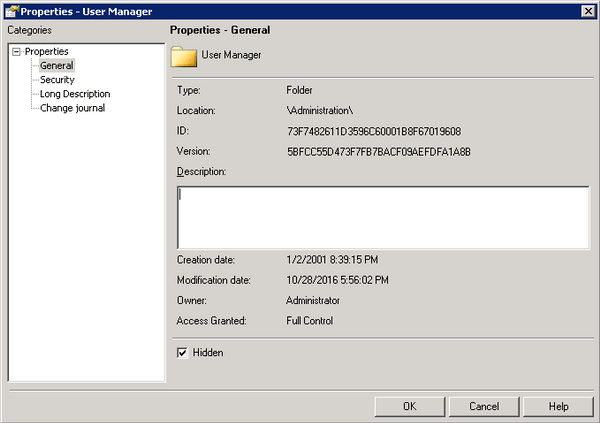
Trying to run the statement "ADD ACE FOR FOLDER "User Manager" GROUP "Managers" ACCESSRIGHTS FULLCONTROL;" will generate an error.

Modifying or adding Folder ACEs are a different outline.

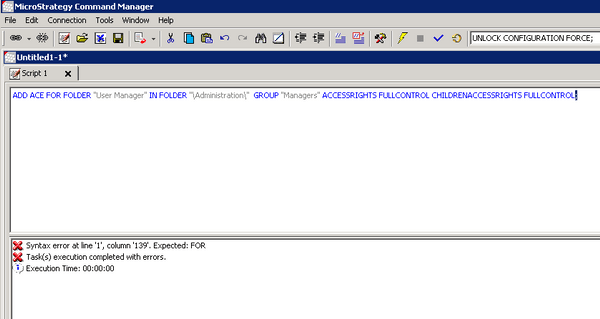
The limitation here is that we must specify a project, and there is no valid project name to the Administration and Configuration objects. Running the statement "ADD ACE FOR FOLDER "User Manager" IN FOLDER "\Administration\" GROUP "Managers" ACCESSRIGHTS FULLCONTROL CHILDRENACCESSRIGHTS FULLCONTROL;" will generate an error.
CAUSE:
This is an identified limitation in Strategy Command Manager for versions 9.x and 10.x
ACTION:
Currently this issue is still under review by Strategy for a potential code addition in an upcoming Strategy release
WORKAROUND:
At this time, the only way to add or modify the ACLs of the User Manager object is through Strategy Developer.

The Strategy Internal Reference Number for the issue discussed in this technical note is US69757
