EducationSoftwareStrategy.com
StrategyCommunity

Knowledge Base

Product

Community

Knowledge Base

TopicsBrowse ArticlesDeveloper Zone

Product

Download SoftwareProduct DocumentationSecurity Hub

Education

Tutorial VideosSolution GalleryEducation courses

Community

GuidelinesGrandmastersEvents
x_social-icon_white.svglinkedin_social-icon_white.svg
Strategy logoCommunity

© Strategy Inc. All Rights Reserved.

LegalTerms of UsePrivacy Policy
  1. Home
  2. Topics

KB31428: Changes made to a template are not reflected correctly in reports using a shortcut to the template in MicroStrategy 10.x


Stefan Zepeda

Salesforce Solutions Architect • Strategy


This article describes a behaviour where changes made to a template are not reflected correctly in reports using a shortcut to the template in MicroStrategy 10.x

SYMPTOM:
Changes made to a template are not reflected across reports using the "shortcut to template" feature. The changes made to the template show unexpected results for some reports while other reports show the changes successfully.
 

  • A template containing with the following definition is used as a shortcut in reports R1 and R2
ka02R000000kc1uQAA_0EM440000002EDq.jpeg
  • Reports R1 and R2 are set to have a shortcut to the template
ka02R000000kc1uQAA_0EM440000002EEB.jpeg
  • In report R1, a metric is removed from the grid and placed in the report objects.
ka02R000000kc1uQAA_0EM440000002EDo.jpeg
  • Template T1 is modified to replace a metric, in the example Profit is replaced by Cost
ka02R000000kc1uQAA_0EM440000002EDm.jpeg
  • The reports R1 and R2 react in a different way to the change on the template
ka02R000000kc1uQAA_0EM440000002EDt.jpeg


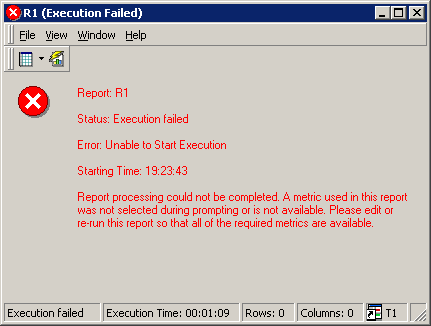
  • In some instances executing the report can return the error
ka02R000000kc1uQAA_0EM440000002EDk.jpeg

 
Sample Code/Error
Report processing could not be completed. A metric used in this report was not selected during prompting or is not available. Please edit or re-run this report so that all of the required metrics are available.
 
CAUSE:
The modified report R1 was converted into an OLAP report at the moment the Profit metric was removed from the grid and placed in the report objects window. OLAP reports can have different grid display as the standard report counterparts. Also, objects in an OLAP report, such as derived metrics, can hold dependencies on the objects removed from the template, for this reason a derived metric was left behind to ensure this dependency is not broken.
 
ACTION:
Manually remove the derived metrics left behind after the change to the template was made.


Comment

0 comments

Details

Knowledge Article

Published:

June 1, 2017

Last Updated:

June 1, 2017