EducationSoftwareStrategy.com
StrategyCommunity

Knowledge Base

Product

Community

Knowledge Base

TopicsBrowse ArticlesDeveloper Zone

Product

Download SoftwareProduct DocumentationSecurity Hub

Education

Tutorial VideosSolution GalleryEducation courses

Community

GuidelinesGrandmastersEvents
x_social-icon_white.svglinkedin_social-icon_white.svg
Strategy logoCommunity

© Strategy Inc. All Rights Reserved.

LegalTerms of UsePrivacy Policy
  1. Home
  2. Topics

KB31446: When making changes in a parent selector, the target selector filters properly but does not automatically populate with a corresponding value, causing the target grid to display no data in MicroStrategy Web 9.x


Community Admin

• Strategy


When making changes in a parent selector, the target selector filters properly but does not automatically populate with a corresponding value, causing a target grid to display no data.

SYMPTOM:
When making changes in a parent selector, the target selector filters properly but does not automatically populate with a corresponding value, causing a target grid to display no data.
 
STEPS TO REPRODUCE:
Use the following steps in the Strategy Tutorial project to reproduce this behavior:
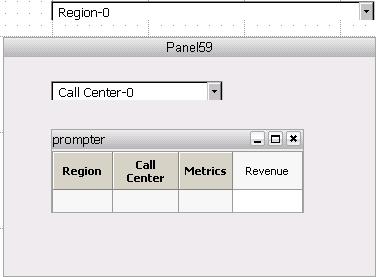
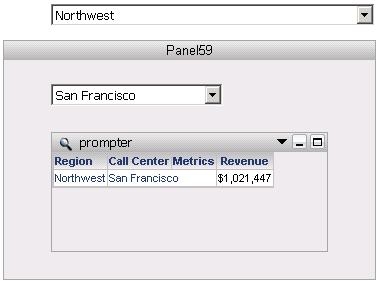
  • Create a simple report containing the Region attribute, the Call Center attribute, and the Revenue metric.
  • Filter the Region attribute either with a prompt or a report filter to return only Northeast and Northwest.
  • Create a dashboard using the report from Step 1.
  • Create a selector for the Region attribute and a selector for the Call Center attribute.
  • Drag the report with formatting onto the dashboard space.
  • Create a panel and place the Call Center selector and the report grid within the panel.
  • Set the Region selector to target the panel and have the Call Center selector target the report grid.


ka04W000000OdRFQA0_0EM4400000028Ef.jpeg
  • Run the dashboard in Interactive mode and notice that the dashboard loads and displays an element for Region, an element for Call Center, and the corresponding grid data with no issue.

ka04W000000OdRFQA0_0EM4400000028Eg.jpeg
  • Change the selection in the Region selector to Northeast. Notice that the selectors are filtered properly, but the child Call Center selector does not automatically populate with a Call Center element associated with the Northeast region.  No data is displayed in the grid as a result.

ka04W000000OdRFQA0_0EM4400000028Ed.jpeg

CAUSE:
This is a common action that can cause an empty selector.  Effectively, there are two selectors that target the same object - the Region selector targets the panel which contains the grid, and the Call Center targets the grid directly.  Thus when one selector is changed, the other is updated, but since no direct change was made to it, it defaults to blank. A user can manually make a selection in the Call Center selector to cause data to display in the grid as needed, but below setting made the action unnecessary.
 
ACTION:
Right-click the Call Center selector, navigate to Properties and Formatting > Selector, and check the box for 'Automatically update when there is no data for the current selection'.
 

ka04W000000OdRFQA0_0EM4400000028Ee.jpeg

 
Changes to the Region selector should now automatically populate the Call Center selector.


Comment

0 comments

Details

Knowledge Article

Published:

June 22, 2017

Last Updated:

June 22, 2017