SYMPTOM:
While executing a script in Strategy Command Manager that alters the Intelligence Server Server Definition the following error message is seen:
Cannot save, move or copy this ServerDef object because it has been changed in the Metadata.
Any outlines which ALTER server settings or any other properties which are stored in the Server Definition such as a project status can potentially encounter the error.
CAUSE:
The Strategy Intelligence Server has cached a version of the Server Definition saved in memory which has since been changed in the metadata. The cached Server Definition is not as up to date.
And the action to trigger this error is not limited to Command manager.
When this issue happens, any other action which tries to modify server definition would see the same error also, e.g modify the trust relationship in Web admin page.
ACTION:
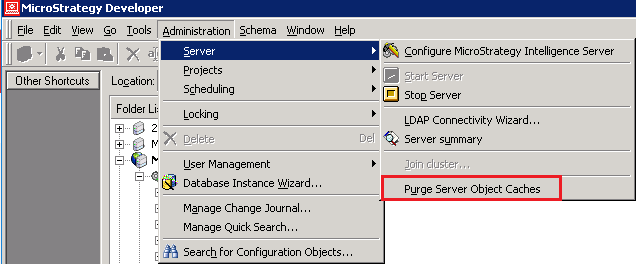
This issue is resolved by purging the Server Object Caches.
This option is available in Strategy Developer under the Administration -> Server -> Purge Server Object Caches:
KB28171
