EducationSoftwareStrategy.com
StrategyCommunity

Knowledge Base

Product

Community

Knowledge Base

TopicsBrowse ArticlesDeveloper Zone

Product

Download SoftwareProduct DocumentationSecurity Hub

Education

Tutorial VideosSolution GalleryEducation courses

Community

GuidelinesGrandmastersEvents
x_social-icon_white.svglinkedin_social-icon_white.svg
Strategy logoCommunity

© Strategy Inc. All Rights Reserved.

LegalTerms of UsePrivacy Policy
  1. Home
  2. Topics

KB31481: Custom number formatting of displaying zero subtotal values as blank is not retained when a report is exported to PDF and Excel file in MicroStrategy Web 9.4.1 and 10.x


Stefan Zepeda

Salesforce Solutions Architect • Strategy


Custom number formatting of displaying zero subtotal values as blank is not retained when a report is exported to PDF and Excel file in MicroStrategy Web 9.4.1 and 10.x

SYMPTOM
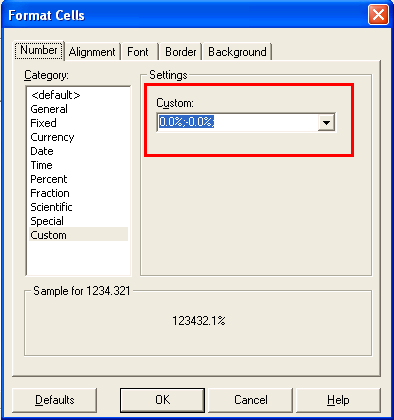
In Strategy Developer 9.4.1 and 10.x, set custom number formatting as the following to display zero subtotal values in report as blank:
0.0%;-0.0%;
 

ka02R000000kbJBQAY_0EM440000002V1A.png

 
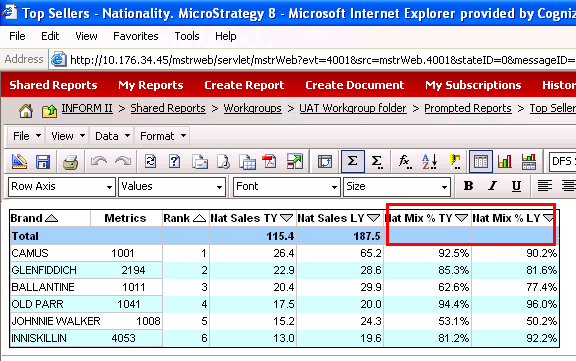
On Web, zero subtotal values in report can be displayed as blank successfully, as shown below:
ka02R000000kbJBQAY_0EM440000002V1G.png

 
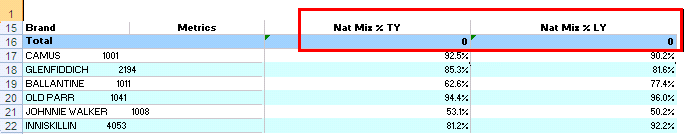
However, it is not retained when the report is exported to PDF and Excel file, as shown below:
ka02R000000kbJBQAY_0EM440000002V1F.png

 
CAUSE
When a report is exported to Excel and PDF file, zero subtotal values are in text format, not numeric values.
Custom number formatting is separated in three parts by two semicolons; only positive numbers, negative numbers and zero values are specified in the order. For the case of zero in text, it is not considered in the number formatting.
 
ACTION
Append one more semicolon in the custom number formatting to specify displaying text as blank as follows: 
0.0%;-0.0%; ;


Comment

0 comments

Details

Knowledge Article

Published:

July 19, 2017

Last Updated:

July 19, 2017