SUMMARY:
This Technical note addresses an identified defect when trying to export attribute thresholds as part of a document with grouping elements in Strategy 10.4.
SYMPTOM:
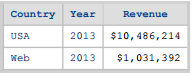
After exporting a document to PDF with an attribute threshold and an attribute in the group-by, the threshold is no longer displayed in the output.


STEPS TO REPRODUCE:
1. In the Strategy Tutorial project, create a report with the attributes Country and Year and the Revenue metric. Save and run the report.

2. Right-Click on the attribute Country and select Thresholds

3. Add the 2 below conditions and format the threshold to display at USA 2014

4. Apply the threshold and save the report.
5. Create a new document and add the dataset just created to a grid.

6. Add the Year attribute to the Grouping section.

7. Save and run the document.

8. Export document to PDF. Threshold formatting is removed from Country attribute.


CAUSE:
This is an identified defect in Strategy 10.4.
ACTION:
This issue has been addressed in Strategy 10.5. Upgrade to this version to take advantage of this fix.
