When interacting with Strategy, customers are given Designated points of contacts who are known as Support Liaisons. These Support Liaisons comes from varying industries, but they typically are system administrators in one capacity or another which is why they are ideal to work hand in hand with Technical Support. Now in the past year Strategy Technical Support has updated their Customer Case Management Portal for their Support Liaisons to log cases through. At this portal, Support Liaisons and only Support Liaisons can login and open cases with Support. All other users will not have this option and should direct their feedback or questions to their organization’s internal administrators.
The first step to open cases with support is to be logged in in our community site, you can do this in the following URL:
https://community.strategy.com/contactsupport
As you log in trough that page being a support liaison you will see the following:

You will be taken to the Strategy Community home page. From there you can search for Knowledge Base articles and user Discussions where you may find that your question has already been answered by another user or Strategy employee.
This option allows you to share your idea with the community allowing it to gain support from other members and be included in a future release. Our product team monitors enhancement requests regularly and are always on the lookout for new functionality to implement.
Here you can log a new case with Strategy Technical Support by providing details regarding your issue.
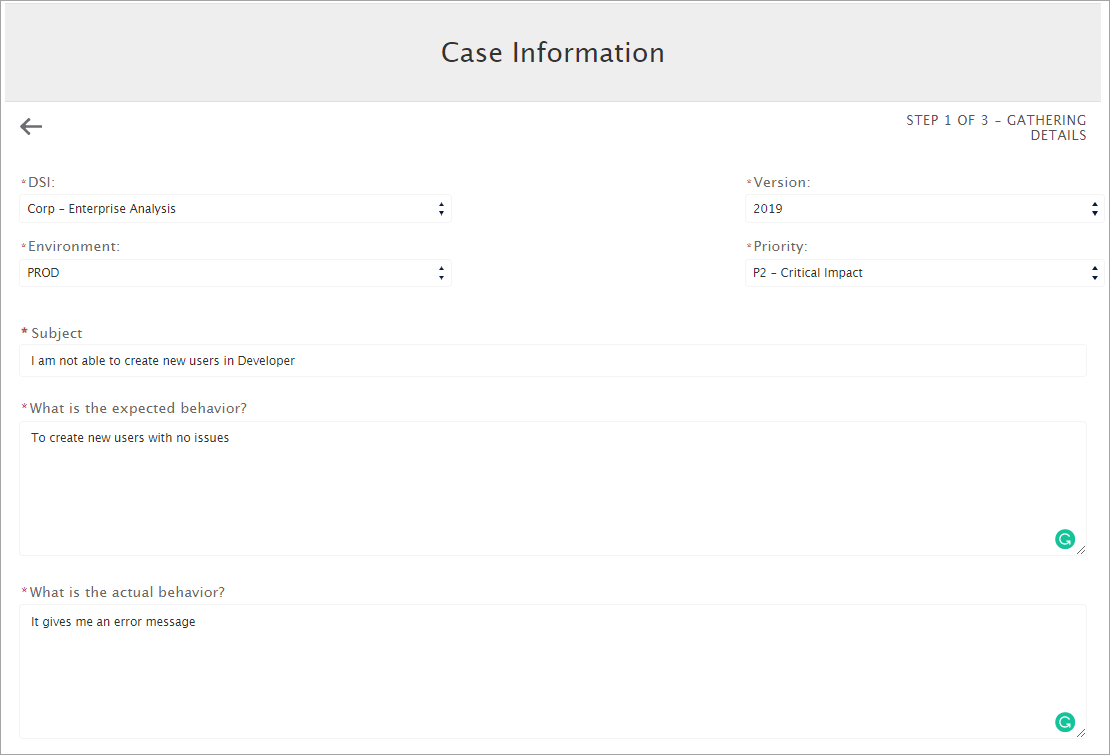
After filling in the details of your issue, you will be shown some recommended Knowledge Base articles that may solve your issue before contacting support:
If you don't find the information you are looking for you can proceed and a support case will be created for you. The details will be sent to you via email.
From here you can verify your open, closed, or development cases submitted to technical support, as well as interact with your team members' cases.
You can also use the Case filter to visualize all cases:
