EducationSoftwareStrategy.com
StrategyCommunity

Knowledge Base

Product

Community

Knowledge Base

TopicsBrowse ArticlesDeveloper Zone

Product

Download SoftwareProduct DocumentationSecurity Hub

Education

Tutorial VideosSolution GalleryEducation courses

Community

GuidelinesGrandmastersEvents
x_social-icon_white.svglinkedin_social-icon_white.svg
Strategy logoCommunity

© Strategy Inc. All Rights Reserved.

LegalTerms of UsePrivacy Policy
  1. Home
  2. Topics

KB31531: The option to run a manual dataload and all additional dataload options are grayed out on MicroStrategy Enterprise Manager console 9.x


Community Admin

• Strategy


On the MicroStrategy Enterprise Manager console, the option to run a manual dataload and all additional dataload options (including option to run custom window dataload) are grayed out.

SYMPTOM
On the Strategy Enterprise Manager console, the option to run a manual dataload and all additional dataload options (including option to run custom window dataload) are grayed out as shown below.
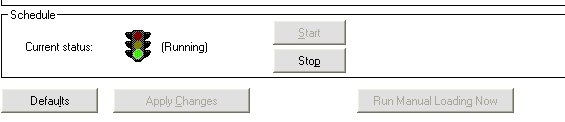


ka04W000001MKrdQAG_0EM440000002Azh.jpeg


CAUSE
A possible cause for this issue is that a successful connection cannot be established to the Strategy Enterprise Manager warehouse with the DSN specified on the Strategy Enterprise Manager console. The DSN is specified under the Tools > Options > DSN tab on the Strategy Enterprise Manager console
 
ACTION
Make sure that the DSN to the Strategy Enterprise Manager warehouse is defined with the correct configuration parameters and ensure that a correct UserID and password are provided on the Strategy Enterprise Manager console to connect to the Strategy Enterprise Manager warehouse.


Comment

0 comments

Details

Knowledge Article

Published:

April 4, 2017

Last Updated:

April 4, 2017