EducationSoftwareStrategy.com
StrategyCommunity

Knowledge Base

Product

Community

Knowledge Base

TopicsBrowse ArticlesDeveloper Zone

Product

Download SoftwareProduct DocumentationSecurity Hub

Education

Tutorial VideosSolution GalleryEducation courses

Community

GuidelinesGrandmastersEvents
x_social-icon_white.svglinkedin_social-icon_white.svg
Strategy logoCommunity

© Strategy Inc. All Rights Reserved.

LegalTerms of UsePrivacy Policy
  1. Home
  2. Topics

KB31549: How to move project source information across computers without re-creating the project sources.


Stefan Zepeda

Salesforce Solutions Architect • Strategy


This Article explains how to move project source information across computers without re-creating the project sources.

SYMPTOM:
A user would like to restore the information for many project sources on a computer but does not want to manually re-create them through Developer or Project Source Manager.
 
CAUSE:
Project source information is stored in the registry:

HKEY_LOCAL_MACHINE\SOFTWARE\Wow6432Node\MicroStrategy\Data Sources

 
ACTION:
It is possible to move the registry settings from one machine to the next. This will only work if the DSNs related to the project sources exist with the same names on the destination computer. If not, create those DSNs before proceeding with the steps below.
 

  • On the source computer, go to Start > Run.
  • Type "regedit."
  • Navigate to
    HKEY_LOCAL_MACHINE\SOFTWARE\Wow6432Node\MicroStrategy\Data Sources.
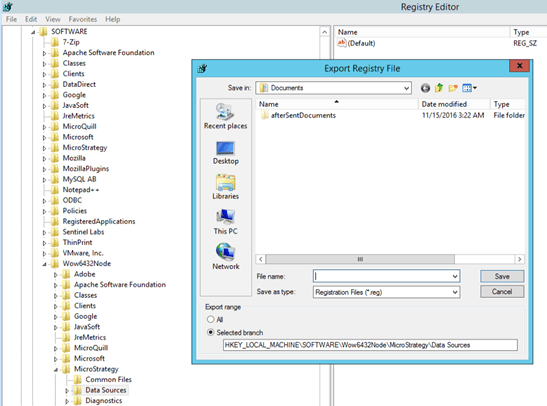
  • Go to File > Export.
  • Select just the branch.
ka02R000000g6dXQAQ_0EM2R000000o5Nu.jpeg
  • Save the file and move it to the destination computer
  • On the destination machine go to File -> Import and select the file

As long as all the DSNs that existed on the source exist on the destination with the same names the entire environment will be identical to the source machine. 
 
NOTE: Users attempting this process should be aware that the CastorServer Data Source entry is the information used by the Intelligence Server to connect to the metadata on startup. If this information is copied from another machine, the DSN and other information for connecting to the metadata should be the same on the target machine, otherwise the Intelligence Server may be unable to start after copying the Data Sources.


Comment

0 comments

Details

Knowledge Article

Published:

June 6, 2017

Last Updated:

June 6, 2017