EducationSoftwareStrategy.com
StrategyCommunity

Knowledge Base

Product

Community

Knowledge Base

TopicsBrowse ArticlesDeveloper Zone

Product

Download SoftwareProduct DocumentationSecurity Hub

Education

Tutorial VideosSolution GalleryEducation courses

Community

GuidelinesGrandmastersEvents
x_social-icon_white.svglinkedin_social-icon_white.svg
Strategy logoCommunity

© Strategy Inc. All Rights Reserved.

LegalTerms of UsePrivacy Policy
  1. Home
  2. Topics

KB31556: How to group and ungroup object elements in a Report Services Document in MicroStrategy Web


Community Admin

• Strategy


The tech note explains how to group and ungroup object elements in a Report Services Document in MicroStrategy Web

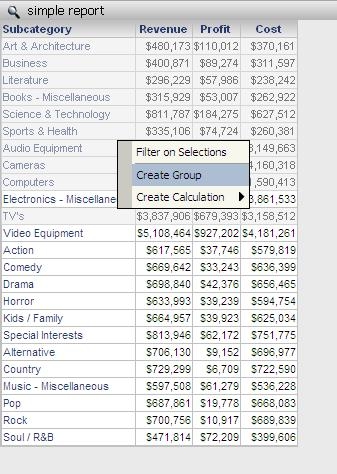
In Strategy Web, multiple grid rows can be selected by holding the Ctrl key. The selected rows can then be viewed as a Group for grids in Documents and for View Reports, which are reports based on Intelligent Cubes:
 

ka04W000000OdhBQAS_0EM4400000028CR.jpeg

 
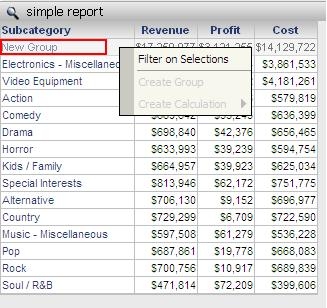
After creating the group, the group can then be used for addition report manipulations:
ka04W000000OdhBQAS_0EM4400000028CQ.jpeg

 
To ungroup the object elements:
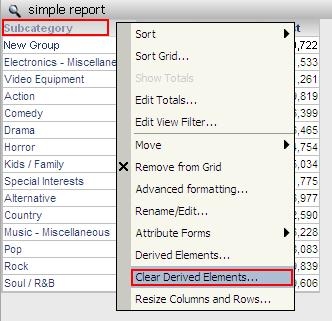
The Create Group feature is only available through document view mode. It creates a derived element whose definition can be edited by right mouse clicking on the attribute header to bring up the Derived Elements editor. On the same right mouse click context menu under the attribute header, users will see an option to clear the derived elements for that attribute which will remove the group(s) created for that attribute.
 
Right click on the attribute header and choose 'Clear Derived Element' to ungroup the attribute(s):
ka04W000000OdhBQAS_0EM4400000028CY.jpeg


Comment

0 comments

Details

Knowledge Article

Published:

April 6, 2017

Last Updated:

April 6, 2017