EducationSoftwareStrategy.com
StrategyCommunity

Knowledge Base

Product

Community

Knowledge Base

TopicsBrowse ArticlesDeveloper Zone

Product

Download SoftwareProduct DocumentationSecurity Hub

Education

Tutorial VideosSolution GalleryEducation courses

Community

GuidelinesGrandmastersEvents
x_social-icon_white.svglinkedin_social-icon_white.svg
Strategy logoCommunity

© Strategy Inc. All Rights Reserved.

LegalTerms of UsePrivacy Policy
  1. Home
  2. Topics

KB31561: History List messages for users are not synchronized across all nodes if they have an active session while a clustered environment disconnects and reconnects a node in MicroStrategy 9.x.


Community Admin

• Strategy


This KB article discusses an issue where user History List messages are not synchronized across all nodes when a node in the clustered environment is disconnected and reconnected into the cluster while user sessions are active.

SYMPTOM
In a Strategy Intelligence Server 9.x clustered environment, History List messages are not synchronized across all nodes of the cluster if one node leaves and re-joins the cluster while there are active user sessions on the servers.
STEPS TO REPRODUCE
The following steps are for a Strategy 9.x clustered environment on Windows with two Intelligence Servers. The nodes are named Node A and Node B. The cluster is set up with localized Cache/Intelligent Cube/Inbox sharing.
 

  • In Strategy Desktop, log into Node A as user "Administrator" and send Report A to history.
  • The History List message can be seen in the Administrator's Inbox on both the nodes.
ka04W000000OdZ0QAK_0EM440000002Aze.jpeg
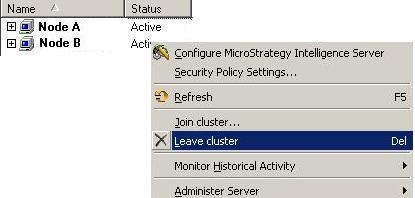
  • On Node A, go to "Cluster Nodes" under "System Administration". Remove Node B from the cluster as seen below:
     
ka04W000000OdZ0QAK_0EM440000002Azf.jpeg
  • From Node A, send Report B to history.
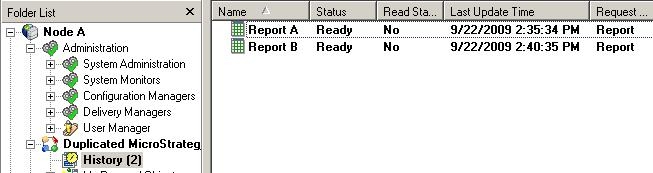
  • The Administrator's Inbox on Node A now has 2 History List Messages.
  • Re-join Node B into Node A 's cluster.
  • From each node check the Administrator's Inbox and notice the number of History List messages on Node A are different from Node B.
     
ka04W000000OdZ0QAK_0EM440000002Azc.jpeg


ka04W000000OdZ0QAK_0EM440000002Azd.jpeg

 
CAUSE
This is working as designed. Strategy Intelligence Server cluster configuration changes should only be made when the system is idle and there are no active user sessions in the cluster.
An enhancement has been logged to display a warning message when the administrator tries to make changes to a cluster while there are active user sessions on the Intelligence Servers.
ACTION
As long as the user sessions are created after the Intelligence Server cluster nodes are joined with each other, History List messages will be synchronized across all nodes of the cluster.


Comment

0 comments

Details

Knowledge Article

Published:

April 11, 2017

Last Updated:

April 11, 2017