SYMPTOM:
When executing a report or document, containing a prompt, against a Teradata warehouse database, the execution seems to randomly hangs. Resulting in the report execution timeouting out as shown below:

After the timeout error is received, the corresponding Database Connection is still listed under the Database Connection Monitor, with a busy status:
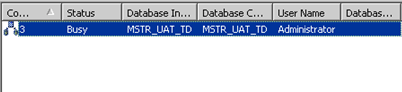
From the database server side, no connection with Strategy can be seen.
CAUSE:
Teradata databases provide failover capabilities that allow end users to connect to different Teradata nodes on the network to serve incoming requests. When creating a DSN referring to a Teradata database, these nodes' IP addresses/machine name combination can be added to enable connectivity and make use of the available nodes, as shown below:
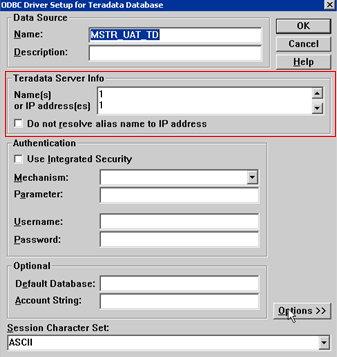
When the Strategy Intelligence Server 8.x/9.x attempts to establish a database connection, one of the specified IP addresses will be chosen to communicate with the Teradata server. If the chosen IP address is no longer valid or the Teradata server cannot be reached, the above described behavior can be seen.
ACTION:
Remove all invalid IP addresses, and machine names, from the Teradata Server Info section on Teradata Warehouse DSN configuration.
