EducationSoftwareStrategy.com
StrategyCommunity

Knowledge Base

Product

Community

Knowledge Base

TopicsBrowse ArticlesDeveloper Zone

Product

Download SoftwareProduct DocumentationSecurity Hub

Education

Tutorial VideosSolution GalleryEducation courses

Community

GuidelinesGrandmastersEvents
x_social-icon_white.svglinkedin_social-icon_white.svg
Strategy logoCommunity

© Strategy Inc. All Rights Reserved.

LegalTerms of UsePrivacy Policy
  1. Home
  2. Topics

KB31590: "MISSING: Microsoft Visual C++ 8 Runtime" error occurs when installing the MicroStrategy 9 API Runtime


Community Admin

• Strategy


Installation of the MicroStrategy 9 API Runtime fails with the following message: "MISSING: Microsoft Visual C++ 8 Runtime".

SYMPTOM:
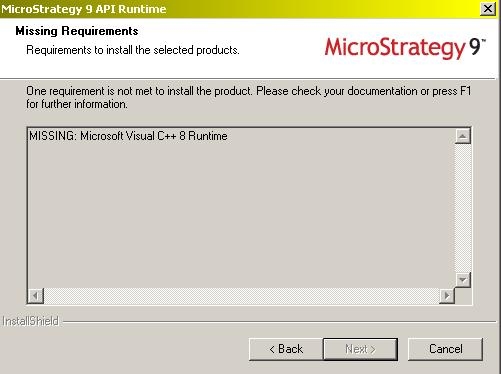
Installation of the Strategy 9 API Runtime fails with the following message:
 

ka04W000000OhcWQAS_0EM440000002HU9.jpeg

 
Sample Code/Error
MISSING: Microsoft Visual C++ 8 Runtime
 
 
CAUSE:
Microsoft Visual C++ 8  (also know as Microsoft Visual C++ 2005) is not installed on the machine where the Strategy 9 API Runtime  will be installed.
 
 
ACTION:
Perform a manual install of Microsoft Visual C++ 8.
 
A stand alone installer for Microsoft Visual C++ 8 (also known as Microsoft Visual C++ 2005) is provided with the Strategy 9 installation files. Run either the 'vcredist_x86.exe', for 32-bit systems, or the corresponding 'vcredist_x64.exe' for 64-bit systems, provided in the following folder:
\Installations\Utilities\3rdParty\vcredist


Comment

0 comments

Details

Knowledge Article

Published:

May 8, 2017

Last Updated:

May 8, 2017