EducationSoftwareStrategy.com
StrategyCommunity

Knowledge Base

Product

Community

Knowledge Base

TopicsBrowse ArticlesDeveloper Zone

Product

Download SoftwareProduct DocumentationSecurity Hub

Education

Tutorial VideosSolution GalleryEducation courses

Community

GuidelinesGrandmastersEvents
x_social-icon_white.svglinkedin_social-icon_white.svg
Strategy logoCommunity

© Strategy Inc. All Rights Reserved.

LegalTerms of UsePrivacy Policy
  1. Home
  2. Topics

KB31602: "You do not have access privileges to create objects of type DB Login" error message occurs when creating a new project in MicroStrategy Developer 9.x Project Builder.


Stefan Zepeda

Salesforce Solutions Architect • Strategy


"You do not have access privileges to create objects of type DB Login" error message occurs when creating a new project in MicroStrategy Developer 9.x Project Builder

SYMPTOM:
When attempting to create a new project in Strategy Developer 9.x
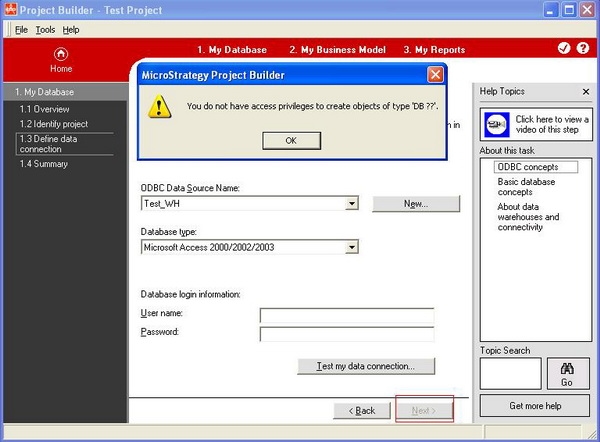
Project Builder, user clicks 'Next' in 'Define data connection' section and then following error message appears:

ka02R000000kcbaQAA_0EM440000002EHl.jpeg

 
Sample Code/Error
You do not have access privileges to create objects of type `DB Login`
STEPS TO REPRODUCE:
Follow the next steps in Strategy Tutorial in order to reproduce the issue.
 

  1. In 'Define data connection' section, click 'Test my data connection'. It states 'The data connection was successfull'.
ka02R000000kcbaQAA_0EM440000002EHc.jpeg


  • But when clicking 'Next', the user gets the error as shown below.
ka02R000000kcbaQAA_0EM440000002EHb.jpeg

CAUSE:
The user account doesn`t have the privilege to create and edit database logins.
 
ACTION:
Follow the next steps in order to grant the "Create and edit database logins" privilege to the user:


  1. Right click the account in 'User Manager' and select 'Edit'.
  2. Go to 'Project Access' and enable 'Create and edit database logins' which is under 'Administration'. After granting this privilege, the user will be able to define the data connection.
ka02R000000kcbaQAA_0EM440000002EHe.jpeg


Comment

0 comments

Details

Knowledge Article

Published:

April 11, 2017

Last Updated:

April 11, 2017