Troubleshooting
Error message ‘’Object with ID ‘X...X’ and type 55 (Document Definition) is not found in metadata" occurs in Strategy Web 10 when using a selector in a Document.
When using a Drop-down selector to filter the display in a source Document from which link was used to open, in a new window, Document from a different project, the error message occurs:
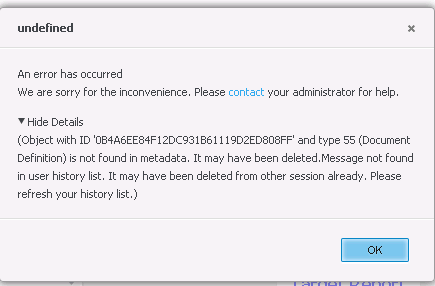
"Object with ID ‘XXXXXXXXXXXXXXXXXXXXXXXXXXXXXXXX’ and type 55 (Document Definition) is not found in metadata. It may have been deleted. Message not found in user history list. It may have been deleted from other session already. Please, refresh your history list.)"

2. Create Report in Strategy Tutorial with: Region, Call Center, Year, Revenue, Profit and Profit Margin (as below)

3. Create a Document in Strategy Tutorial with dataset from the Report created in step 2
4. In the Document, add a grid to the document from the Report, a drop-down selector, and a text field with a link targeting the Report from Human Resources Analysis Module as per screenshots below


5. Run the Document in Presentation Mode
6. Click on the link and log to the other project to display the targeted Report
7. Go back to the source Document and try to change the choice in the Drop Down selector

8. The error message pops up as per below image
Why is this happening?
This is a known issue in Strategy 10.
Status
ACKNOWLEDGED IN-PROGRESS SOLVED (Version: 10.4.1+)
Next Steps
The issue has been resolved in Strategy 10.4 Hotfix 1. Please upgrade to this or a newer version of Strategy.
Additional Information
1. The issue does not occur if the target Report is in the same project as the source Document
2. The issue occurs only in Presentation Mode and is specific to the drop-down selector style
3. There is a workaround in available in Strategy 10.2:
If you have any additional questions, please feel free to contact the Strategy Support Team.
