EducationSoftwareStrategy.com
StrategyCommunity

Knowledge Base

Product

Community

Knowledge Base

TopicsBrowse ArticlesDeveloper Zone

Product

Download SoftwareProduct DocumentationSecurity Hub

Education

Tutorial VideosSolution GalleryEducation courses

Community

GuidelinesGrandmastersEvents
x_social-icon_white.svglinkedin_social-icon_white.svg
Strategy logoCommunity

© Strategy Inc. All Rights Reserved.

LegalTerms of UsePrivacy Policy
  1. Home
  2. Topics

KB316621: Custom ESM is not called when a session timeout occurs while viewing a Visual Insight dashboard in MicroStrategy Web 10.3


Community Admin

• Strategy


Custom ESM is not called when a session timeout occurs while viewing a Visual Insight dashboard in MicroStrategy Web 10.3

SYMPTOM: 
Custom ESM is not called when a session timeout occurs while viewing a Visual Insight dashboard in Strategy Web 10.3. 
 
STEPS TO REPRODUCE:
  1. Create a custom ESM to implement single sign on in Web by referring to the sample code on MSDZ: https://www2.Strategy.com/producthelp/Current/WebSDK/Content/topics/esm/Creating_a_Custom_External_Security_Module_ESM.htm
  2. Go to Web, create a dashboard. Leave the page on.
  3. Go to Developer and Administration > System Monitors > User Connections page,  select the user connection for the step 1 and disconnect it to kill the Web user session.
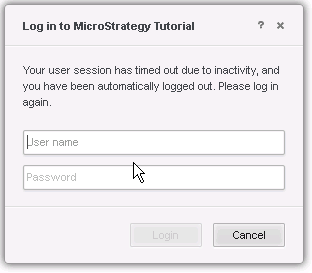
  4. Go back to Web and note that the login editor is shown as below and custom ESM is not called.


ka04W000000OfsrQAC_0EM4400000025Qg.jpeg

CAUSE: 
This is a known defect with Strategy Web 10.3. 
 
ACTION: 
This issue has been addressed in Strategy 10.6 a "Feature Release". Before upgrading to the 10.6 version please review the differences between a "Feature Release" and a "Platform Release". These differences are detailed here. For any questions or concerns regarding the "Feature Release" and the "Platform Release" please contact Strategy Technical Support. 
 
WORKAOURND:
Go to folder where the Strategy web application is installed, then edit the file sys_defaults.xml under \WEB-INF\xml and change the value from 0 to 1 by modifying the property v="0" to v="1" in the following tag:


<pr des="Whether to disable login editor after session time out" n="disableLoginEditor" scp="system" v="1" dt="boolean"/>


Comment

0 comments

Details

Knowledge Article

Published:

May 30, 2017

Last Updated:

August 26, 2022