EducationSoftwareStrategy.com
StrategyCommunity

Knowledge Base

Product

Community

Knowledge Base

TopicsBrowse ArticlesDeveloper Zone

Product

Download SoftwareProduct DocumentationSecurity Hub

Education

Tutorial VideosSolution GalleryEducation courses

Community

GuidelinesGrandmastersEvents
x_social-icon_white.svglinkedin_social-icon_white.svg
Strategy logoCommunity

© Strategy Inc. All Rights Reserved.

LegalTerms of UsePrivacy Policy
  1. Home
  2. Topics

KB316725: Users are unable to filter tables belonging to a specified schema in the MicroStrategy Warehouse Catalog while using the MicroStrategy Hive ODBC driver


Community Admin

• Strategy


Users are unable to filter tables belonging to a specified schema in the MicroStrategy Warehouse Catalog while using the MicroStrategy Hive ODBC driver

SYMPTOM
In Strategy Secure Enterprise 10.4 and later, when trying to view the warehouse catalog while connecting to a Hive instance that uses the Strategy Hive ODBC Driver, users might see various tables belonging to different schemas being displayed. This may lead to a degradation in performance or cause the Warehouse Catalog to hang.
 
CAUSE
This behavior is expected with the Strategy Warehouse Catalog as it cannot filter based on a specific schema. 
 
ACTION
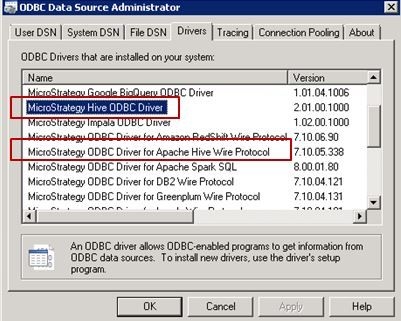
  • Create a new DSN from the  ODBC administrator and use the Strategy ODBC Driver for Hive Wire Protocol instead of using the 'Strategy Hive ODBC Driver'. The Strategy Hive driver is a new driver that is available in the product starting with Strategy version 10.4 as shown below. 

ka04W000000OhKEQA0_0EM440000002C0L.jpeg
  • After creating a DSN with the Strategy ODBC Driver for Hive Wire Protocol, navigate to the Advanced settings and enable the 'Use current schema for catalog functions' check box from the advanced tab. 

ka04W000000OhKEQA0_0EM440000002C0E.jpeg
  • On Linux operating systems, edit the odbc.ini file and create a DSN to hive using the Strategy ODBC Driver for Apache Hive Wire Protocol (Refer to the odbc.ini.example file). Set the following  parameter: UseCurrentSchema=1
     
  • While using Strategy Desktop or Strategy Web, check the 'Edit connection string' check box and update the connection string to the following after replacing the values for servername,portname and database:
     
    
    DRIVER={Strategy ODBC Driver for Apache Hive Wire Protocol Desktop};HostName=servername;PortNumber=portname;Database=database;WireProtocolVersion=2;UseNativeCatalogFunctions=1;UseCurrentSchema=1;


ka04W000000OhKEQA0_0EM440000002C0N.jpeg

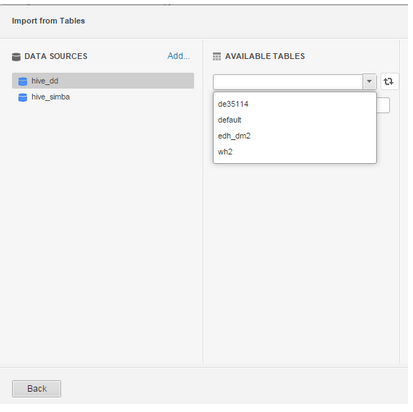
Note: Even though all the namespaces show up, only tables the database specified in the data source creation (wh2 in the following example) will be displayed: 
ka04W000000OhKEQA0_0EM440000002C0K.jpeg
ka04W000000OhKEQA0_0EM440000002C0A.jpeg
ka04W000000OhKEQA0_0EM440000002C0D.jpeg

Comment

0 comments

Details

Knowledge Article

Published:

May 25, 2017

Last Updated:

May 25, 2017