EducationSoftwareStrategy.com
StrategyCommunity

Knowledge Base

Product

Community

Knowledge Base

TopicsBrowse ArticlesDeveloper Zone

Product

Download SoftwareProduct DocumentationSecurity Hub

Education

Tutorial VideosSolution GalleryEducation courses

Community

GuidelinesGrandmastersEvents
x_social-icon_white.svglinkedin_social-icon_white.svg
Strategy logoCommunity

© Strategy Inc. All Rights Reserved.

LegalTerms of UsePrivacy Policy
  1. Home
  2. Topics

KB31685: "Server Error in /MicroStrategy Application. java.lang.IllegalStateException: Timer already cancelled" error shows when trying to access MicroStrategy Web 9.x


Community Admin

• Strategy


Users get an error 'Server Error in '/MicroStrategy' Application. java.lang.IllegalStateException: Timer already cancelled' when trying to access MicroStrategy Web 9.x

SYMPTOM:
Users get an error 'Server Error in '/Strategy' Application. java.lang.IllegalStateException: Timer already cancelled' when trying to access Strategy Web 9.x
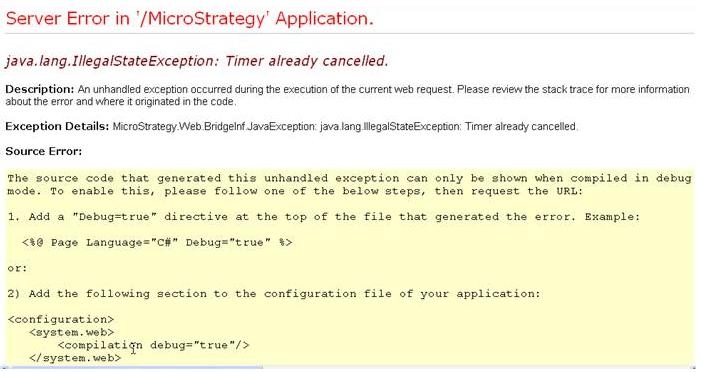
 

ka04W000000OdVRQA0_0EM4400000028Ck.jpeg


java.lang.IllegalStateException: Timer already cancelled.

Description: An unhandled exception occurred during the execution of the current web request. Please review the stack trace for more information about the error and where it originated in the code.

Exception Details: Strategy.Web.BridgeInf.JavaException: java.lang.IllegalStateException: Timer already cancelled.

 
The stack trace is also displayed:


 Strategy.Web.BridgeInf.AbstractWebBridge.HandleBridgedMethodException(BridgedMethodException bme, SystemServices sysSvcs) +173

   Strategy.Web.BridgeInf.AbstractWebBridge.CallVoidMethod(Int32 classNdx, Int32 methodNdx, IList lstArgs, SystemServices sysSvcs) +98

   Strategy.Web.Controller.AppController.InitializeApp(IContainerServices cs) +127

   Strategy.MSTRControls.MSTRWebApplication.InitializeController(String sServletName, String sWebXMLFile, String sAppContextName, String sControllerClassName, String sControllerName, String sBasePath, String sApplicationPath, String sRequestServerName) +538

   Strategy.MSTRControls.MSTRWebApplication.InitializeAllControllers() +395

   Strategy.GlobalApp.Application_BeginRequest(Object sender, EventArgs e) +67

   System.Web.SyncEventExecutionStep.System.Web.HttpApplication.IExecutionStep.Execute() +92

   System.Web.HttpApplication.ExecuteStep(IExecutionStep step, Boolean& completedSynchronously) +64
 
After restarting the IIS Web server, users can temporaily access Web.  However, eventually the same error will occur.
 
CAUSE:
This issue is specific to Strategy Web installationWindows Server 2003.
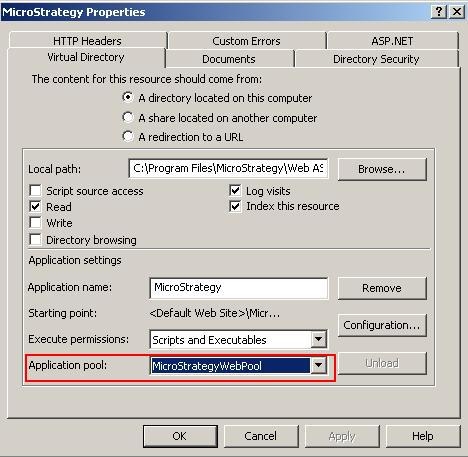
The cause of the issue is the incorrect mapping of the Application Pool in the IIS properties.
 
ACTION:
Choose the StrategyWebPool as the Application Pool in Control Panel - Administrative Tools - IIS - Web Sites - Strategy Properties:


ka04W000000OdVRQA0_0EM4400000028Cj.jpeg


Comment

0 comments

Details

Knowledge Article

Published:

June 21, 2017

Last Updated:

June 21, 2017