SUMMARY:
This technical note documents an issue observed when using the Visual Insight Live Connect option to connect to an SAP data source and exporting the results to Excel or PDF, in Strategy Analytics Enterprise 10.x.
SYMPTOM:
When creating an SAP BEX Query, using the BEX Query Designer, a few display settings can be applied at the metric level. One of them is "Sign Change", where one can choose whether they want to display the metric values with their original sign or they want to revert it. When using "Reverse Sign", positive values will be converted into negative and vice versa.
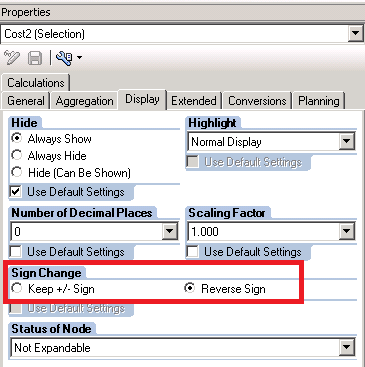
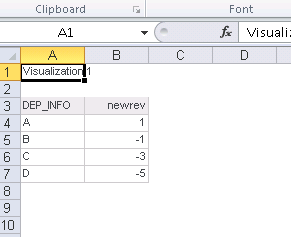
The issue described in this technical note will occur when using the Live Connect option, available from Visual Insight, to connect to an SAP datasource. After creating a report with attributes and a metric with a reverse sign and exporting it to Excel or PDF, the sign is not preserved.
These are the steps to reproduce:
1. From Strategy Web, create a new dashboard.
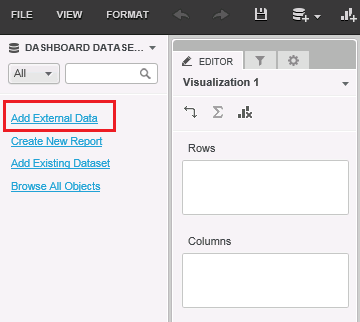
2. Click Add External Data:
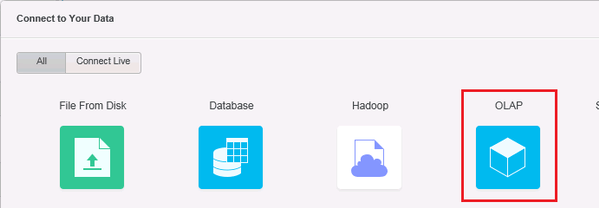
3. Select OLAP in the Live Connect data source types:
4. Connect to the SAP data source and select the query to be imported.
5. Create a report adding the metric that has its sign reverted in the SAP side settings:
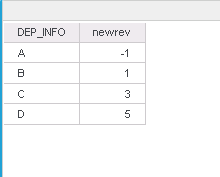
6. Export the grid to Excel or PDF. The metric sign is reverted:
CAUSE:
This is a known issue in Strategy Analytics Enterprise 10.x, which is currently under investigation.
ACTION:
This issue has been addressed in Strategy 10.4 HF3 and 10.7.
WORKAROUND:
This issue does not occur when exporting a report created off an SAP cube imported through the MDX Cube Catalog.
The internal reference number for the issue described in this document is DE49874.
