EducationSoftwareStrategy.com
StrategyCommunity

Knowledge Base

Product

Community

Knowledge Base

TopicsBrowse ArticlesDeveloper Zone

Product

Download SoftwareProduct DocumentationSecurity Hub

Education

Tutorial VideosSolution GalleryEducation courses

Community

GuidelinesGrandmastersEvents
x_social-icon_white.svglinkedin_social-icon_white.svg
Strategy logoCommunity

© Strategy Inc. All Rights Reserved.

LegalTerms of UsePrivacy Policy
  1. Home
  2. Topics

KB31780: After setting the "Path to MicroStrategy Office Installation" link from the Web Administrator page to a path where the officeinstall.htm file is found, users still receive a "The page cannot be found" error when accessing the link.


Community Admin

• Strategy


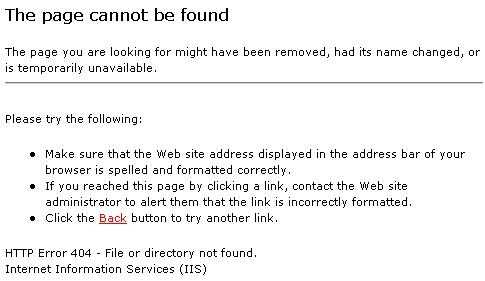
After setting the 'Path to MicroStrategy Office Installation' link from the MicroStrategy Web Admin page to a path where the officeinstall.htm file is found, users may still receive a 'The page cannot be found' error when accessing the link in MicroStrategy Web.

SYMPTOM:
After setting the 'Path to Strategy Office Installation' link from the Strategy Web Admin page to a path where the officeinstall.htm file is found, users may still receive a 'The page cannot be found' error when accessing the link in Strategy Web 9.0.x.
 

ka04W000001489WQAQ_0EM4400000028C6.jpeg

Sample Code/Error
The page cannot be found.  HTTP Error 404 - File or directory not found.  Internet Information Services (IIS)


The error is thrown even though the user has specified a valid url path to the officeinstall.htm file where the Strategy Web Services install is:
 

ka04W000001489WQAQ_0EM4400000028CM.jpeg


Further, clicking the Go button from the Web Administrator page to test the link results in the expected Office installation page:
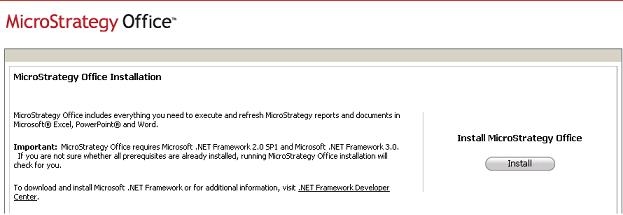
 

ka04W000001489WQAQ_0EM4400000028Br.jpeg

 
 After clicking 'Save' and attempting to access the link from the Strategy Web Home page, users hit the 'The page cannot be found' message shown above.
 

ka04W000001489WQAQ_0EM4400000028Bt.jpeg

 
CAUSE:
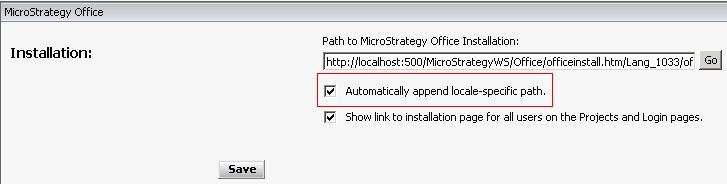
A possible cause for this behavior is the use of the 'Automatically append locale-specific path' option which was added to the Strategy Office Installation page in Strategy 9.0.x.
 

ka04W000001489WQAQ_0EM4400000028C8.jpeg

 
Using this option, users will notice that the URL specified for defining the Office Installation link changes so that '/Lang_1033/officeinstall.htm' is appended to the given URL.

 

ka04W000001489WQAQ_0EM4400000028C7.jpeg

 
When this is appended, the URL path specified by the user becomes invalidated.
 
ACTION:
There are two options for resolving this issue:
  1. Users can simply uncheck the 'Automatically append locale-specific path' setting to force the application to use the link specified.
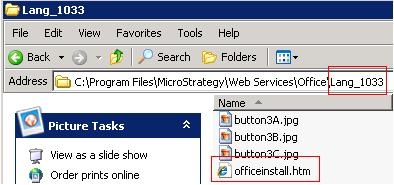
  2. Users can define a valid installation path that includes the appended reference, such as 'http://webServerName/StrategyWS/Office/Lang_1033/officeinstall.htm'.  Navigating to the appended path location on the Web Services machine should show that the officeinstall.htm file does exist there:
ka04W000001489WQAQ_0EM4400000028CN.jpeg

 
Either one of the options above should lead users to the Strategy Office Installation page when the 'Install Strategy Office' link is clicked from the Strategy Web Home page.


Comment

0 comments

Details

Knowledge Article

Published:

June 22, 2017

Last Updated:

June 22, 2017