EducationSoftwareStrategy.com
StrategyCommunity

Knowledge Base

Product

Community

Knowledge Base

TopicsBrowse ArticlesDeveloper Zone

Product

Download SoftwareProduct DocumentationSecurity Hub

Education

Tutorial VideosSolution GalleryEducation courses

Community

GuidelinesGrandmastersEvents
x_social-icon_white.svglinkedin_social-icon_white.svg
Strategy logoCommunity

© Strategy Inc. All Rights Reserved.

LegalTerms of UsePrivacy Policy
  1. Home
  2. Topics

KB31782: Users are unable to access right-click context menu properties settings for a widget displayed on a dashboard viewed under Flash mode in MicroStrategy Web 9.0.x.


Community Admin

• Strategy


Users are unable to access right-click context menu properties settings for a widget displayed on a dashboard viewed under Flash mode in MicroStrategy Web 9.0.x.

SYMPTOM:
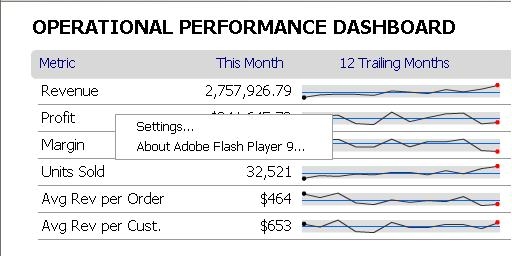
A user logged into Strategy Web 9.0.x may notice that they are unable to access any of the right-click properties menus associated with a particular widget on a dashboard or document when viewed in Flash mode.
 

ka04W000000Of2HQAS_0EM4400000028Bd.jpeg

 
CAUSE:
A possible cause for this issue is that the user is logged in as a Web user that does not have the correct set of privileges to access the right-click properties menus of the widget.  For example, the user may only be logged in as a Web Reporter.
 
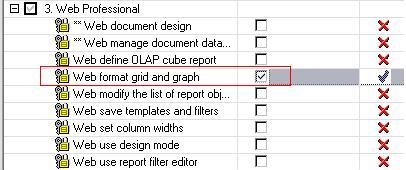
At minimum, the user needs to have the 'Web format grid and graph' privilege under the Web Professional privilege group.
 
ACTION:
Grant the user at least the 'Web format grid and graph' privilege under the Web Professional privilege group using the user editor in Strategy Desktop:
 

ka04W000000Of2HQAS_0EM4400000028Bk.jpeg

 
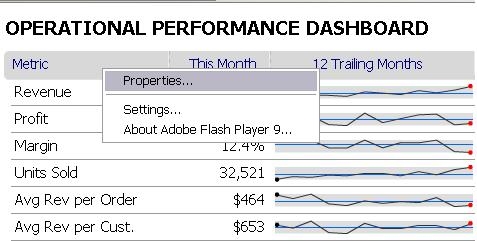
The user should now be able to access the right-click properties menus for any given widget in Flash mode:
 

ka04W000000Of2HQAS_0EM4400000028Bm.jpeg


Comment

0 comments

Details

Knowledge Article

Published:

June 15, 2017

Last Updated:

June 15, 2017