EducationSoftwareStrategy.com
StrategyCommunity

Knowledge Base

Product

Community

Knowledge Base

TopicsBrowse ArticlesDeveloper Zone

Product

Download SoftwareProduct DocumentationSecurity Hub

Education

Tutorial VideosSolution GalleryEducation courses

Community

GuidelinesGrandmastersEvents
x_social-icon_white.svglinkedin_social-icon_white.svg
Strategy logoCommunity

© Strategy Inc. All Rights Reserved.

LegalTerms of UsePrivacy Policy
  1. Home
  2. Topics

KB31783: Do not see a scroll bar on the side of a grid when the grid is in a panel on a Report Service Document in MicroStrategy Web


Community Admin

• Strategy


SYMPTOM:
When working with report grids placed in panels on Report Service Documents, users may encounter an issue where they do not have a scroll bar available for scrolling through all of the elements of their report grid:
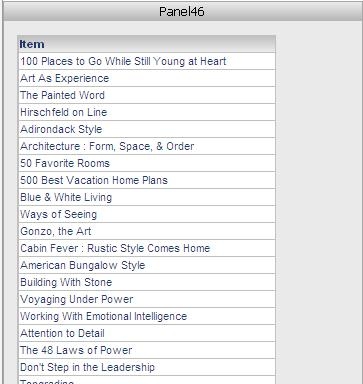
 

ka04W000000Odl0QAC_0EM4400000028BN.jpeg

 
STEPS TO REPRODUCE:
Use the following steps to reproduce this behavior in the Strategy Tutorial project:

  1. From Strategy Web create a simple report containing on the Item attribute.
  2. Create a Report Services document using the report from step one as the dataset.
  3. Create a panel in the Detail Header section of the document and add the report grid to the panel with formatting.
  4. Run the document in Interactive Mode.  Notice that there is no scrollbar.

CAUSE:
This issue occurs because of the default Size and Grid Overflow settings for the grid within the Report Service Document do not allow for a scroll bar.
 
ACTION:
Use the following steps to resolve this issue in the Strategy Tutorial project:
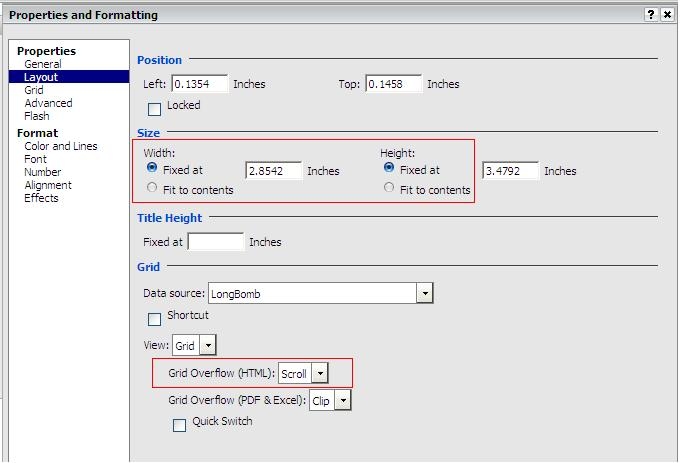
  • View the document in Editable mode, right-click the grid within the document, and select Advanced Formatting.
  • From the Properties and Formatting menu, select the Layout section from the tree on the left.
  • Set the Size > Width and Height to Fixed.
  • Set the Grid > Grid Overflow (HTML) to Scroll.


ka04W000000Odl0QAC_0EM4400000028Bc.jpeg
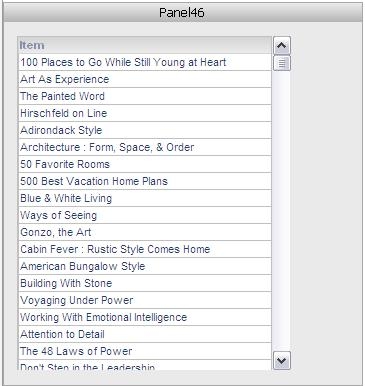
  • Switch back to Interactive mode and notice that there are now scroll bars present to the side of the grid.

ka04W000000Odl0QAC_0EM4400000028Ba.jpeg


Comment

0 comments

Details

Knowledge Article

Published:

June 16, 2017

Last Updated:

June 16, 2017