After creating and importing Strategy Object Manager packages, the log file generated to capture the details of the action is configured using Strategy Diagnostics and Performance Logging. The log file location is specified under Client Services > Source Manipulator, as shown:
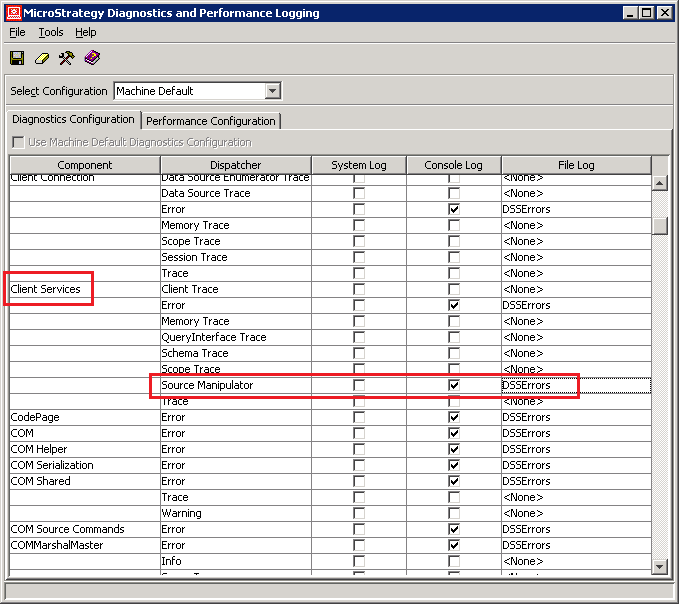
By default, the entries are logged in the DSSErrors.log file.
The log entries will look similar to the following for object creations:
2009-10-05 16:51:16.694-05:00 [Client services] [Source Manipulator] C:\Program Files\Common Files\Strategy\ProjectPackage.mmp: Opening delta file for writing

.2009-10-05 16:51:16.694-05:00 [Client services] [Source Manipulator] C:\Program Files\Common Files\Strategy\ProjectPackage.mmp: Writing rule domain=object resolution=use-existing parts=definition,nameObject(Name="prompt" Type=Report Definition ID=AFC754FB49B6460EBFFBAA9E7789FAAB Proj=B19DEDCC11D4E0EFC000EB9495D0F44F Ver=F45C5C534660844325CCCF9C51EBBF05 )

2009-10-05 16:51:17.163-05:00 [Client services] [Source Manipulator]  C:\Program Files\Common Files\Strategy\ProjectPackage.mmp: Writing update schema command, with parameter 0

2009-10-05 16:51:17.163-05:00 [Client services] [Source Manipulator] C:\Program Files\Common Files\Strategy\ProjectPackage.mmp: Closing delta file
2009-10-02 14:04:09.256-05:00 [Client services] [Source Manipulator]  Starting bulk merge from delta file 'C:\Program Files\Common Files\Strategy\ProjectPackage.mmp'
2009-10-02 14:04:09.365-05:00 [Client services] [Source Manipulator]  Examining Object(Name="prompt" Type=Report Definition ID=AFC754FB49B6460EBFFBAA9E7789FAAB Proj=B19DEDCC11D4E0EFC000EB9495D0F44F Ver=F45C5C534660844325CCCF9C51EBBF05 ), replacement path = "Profiles\Administrator\My Reports"

2009-10-02 14:04:09.365-05:00 [Client services] [Source Manipulator] ... no change made to object definition, because existing object is identical (same VersionID).

2009-10-02 14:04:09.412-05:00 [Client services] [Source Manipulator]  Bulk merge from delta file 'C:\Program Files\Common Files\Strategy\ProjectPackage.mmp' successfully completed
2009-10-02 14:07:25.631-05:00 [Client services] [Source Manipulator] Starting bulk merge from delta file 'C:\Program Files\Common Files\Strategy\ProjectPackage.mmp'

2009-10-02 14:07:25.850-05:00 [Client services] [Source Manipulator] Examining Object(Name="prompt" Type=Report Definition ID=AFC754FB49B6460EBFFBAA9E7789FAAB Proj=B19DEDCC11D4E0EFC000EB9495D0F44F Ver=F45C5C534660844325CCCF9C51EBBF05 ), replacement path = "Profiles\Administrator\My Reports"

2009-10-02 14:07:25.881-05:00 [Client services] [Source Manipulator] ... no corresponding object in destination, so object will be merged

2009-10-02 14:07:26.037-05:00[Client services] [Source Manipulator]  Bulk merge from delta file 'C:\Program Files\Common Files\Strategy\ProjectPackage.mmp' successfully completed
