EducationSoftwareStrategy.com
StrategyCommunity

Knowledge Base

Product

Community

Knowledge Base

TopicsBrowse ArticlesDeveloper Zone

Product

Download SoftwareProduct DocumentationSecurity Hub

Education

Tutorial VideosSolution GalleryEducation courses

Community

GuidelinesGrandmastersEvents
x_social-icon_white.svglinkedin_social-icon_white.svg
Strategy logoCommunity

© Strategy Inc. All Rights Reserved.

LegalTerms of UsePrivacy Policy
  1. Home
  2. Topics

KB31830: How to prevent Distribution Services to send emails for empty reports in Microstrategy Developer


Stefan Zepeda

Salesforce Solutions Architect • Strategy


This article describes how to prevent Distribution Services from sending emails for empty reports.

In order to prevent Distribution Services from sending emails containing empty reports in Strategy Developer, change the Distribution Services Error Handling as follows:
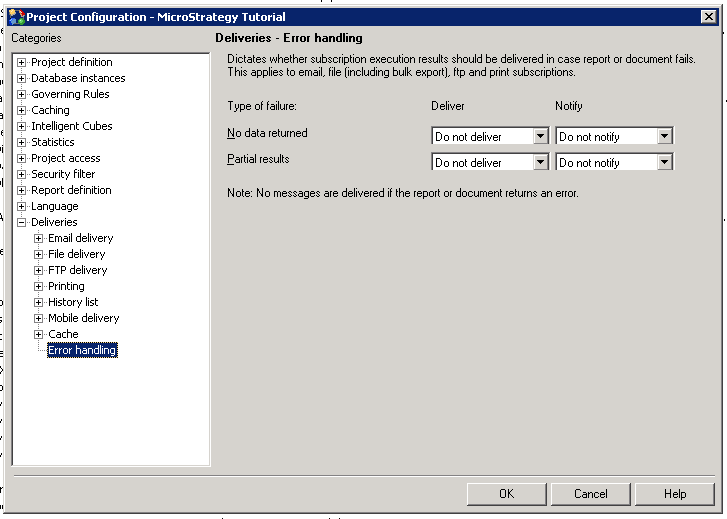
  • Connect to project source
  • Right click on the project for which you wish to apply the setting and choose 'Project configuration' from dropdown.
  • In 'Project configuration' dialog go to 'Deliveries' category on the left hand side.
  • Then go to Error handling.

ka02R000000kbNiQAI_0EM440000002XCT.png
  • For 'No data returned' choose 'Do not deliver' in the dropdown.

 
From now on if no data is returned for report, the report will not be delivered by Distribution Services.
 
The appropriate entry will be added to DSSErrors.log file indicating that the delivery is skipped due to no data returned.


2009-10-21 12:45:00.505+01:00 Distribution Service: MSIDeliveryEngine::Delivery: The report REPORTAME does not return any data. Skip delivery.


Comment

0 comments

Details

Knowledge Article

Published:

July 14, 2017

Last Updated:

July 14, 2017