EducationSoftwareStrategy.com
StrategyCommunity

Knowledge Base

Product

Community

Knowledge Base

TopicsBrowse ArticlesDeveloper Zone

Product

Download SoftwareProduct DocumentationSecurity Hub

Education

Tutorial VideosSolution GalleryEducation courses

Community

GuidelinesGrandmastersEvents
x_social-icon_white.svglinkedin_social-icon_white.svg
Strategy logoCommunity

© Strategy Inc. All Rights Reserved.

LegalTerms of UsePrivacy Policy
  1. Home
  2. Topics

KB318341: When adding a prompt answer wildcard to the title of a graph, the full text shows instead of only the prompt answer in MicroStrategy 10.x


Community Admin

• Strategy


This article discusses an issue with users see extra unwanted text when adding prompt wildcards into graph titles.

SUMMARY
This article discusses an issue with users see extra unwanted text when adding prompt wildcards into graph titles.
 
SYMPTOM
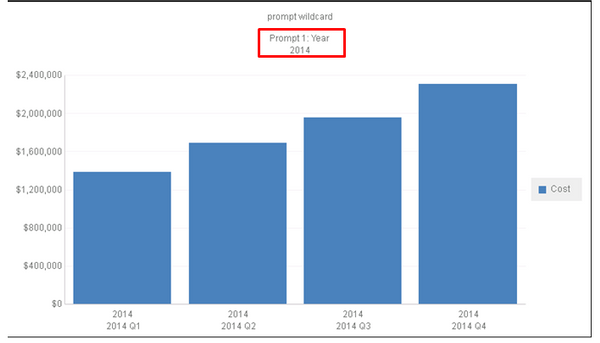
When adding a prompt answer wildcard {&PROMPT1&} to the title of a graph, the title returns as “Prompt 1: [Prompt Title] [Prompt Answer]” when the prompt wildcard should just return as the prompt answer.
 

ka04W000000OcbJQAS_0EM440000002Bzu.jpeg

 
CAUSE
This is working as designed in Strategy 10.x and is caused by the “Prompt Details” setting not being applied altered to the designed option for documents and Reports.
 
STEPS TO REPRODUCE

  1. Create report in Tutorial with 'Year' 'Quarter' and 'Cost' 
  2. Create prompt on 'Year' 
  3. Graph > Titles and Labels > Titles > 'Title' > "{&PROMPT1&}" 
  4. Run report and select a year for prompt answer. 
  5. Project Configuration > Project Definition > Documents and Reports > Report details properties under "Prompt Details", "Include Prompt Titles" switch from " Title and Index' to ' No Title and Index'. Save and close out of Project Configuration. 
  6. Go back into Prompt details and switch back from 'No title and Index' to "Title and Index' 
  7. Run report 
  8. See graph title includes prompt wildcard

 
ACTION
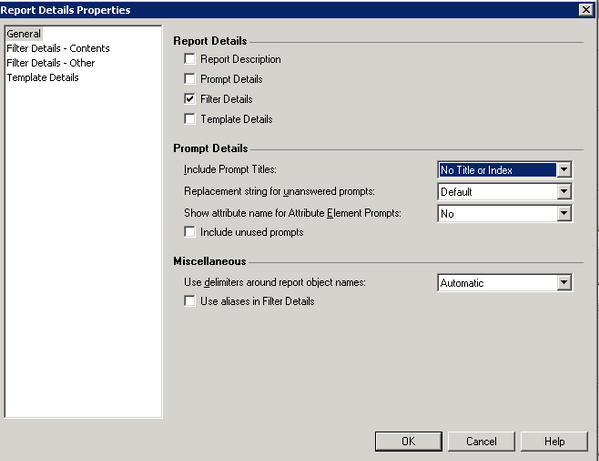
Go to Project Configuration > Project Definition >Documents and Reports > Report details properties Switch the setting “Include Prompt Titles” to “No Title or Index’.
 

ka04W000000OcbJQAS_0EM440000002Bzx.jpeg


Comment

0 comments

Details

Knowledge Article

Published:

May 2, 2017

Last Updated:

May 2, 2017