EducationSoftwareStrategy.com
StrategyCommunity

Knowledge Base

Product

Community

Knowledge Base

TopicsBrowse ArticlesDeveloper Zone

Product

Download SoftwareProduct DocumentationSecurity Hub

Education

Tutorial VideosSolution GalleryEducation courses

Community

GuidelinesGrandmastersEvents
x_social-icon_white.svglinkedin_social-icon_white.svg
Strategy logoCommunity

© Strategy Inc. All Rights Reserved.

LegalTerms of UsePrivacy Policy
  1. Home
  2. Topics

KB318367: Text boxes placed on top of the images cannot be exported to Microsoft Word


Community Admin

• Strategy


This Knowledge Base article describes a known issue that text boxes placed on top of the images cannot be exported to Microsoft Word. MicroStrategy will continue to investigate and post updates as soon as they are available.

SYMPTOM:
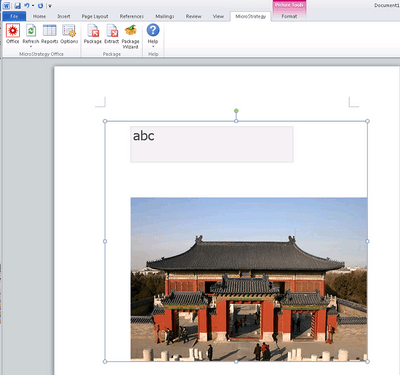
After exporting report services document to Microsoft Word through Strategy Office 10.5, text boxes placed on top of the images cannot be displayed.
 
STEPS TO REPRODUCE:
  • Insert an image to the report services document in Strategy Web 10.5.
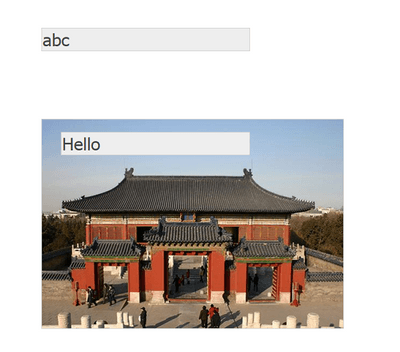
  • Add a text box on top of the image, and another text box outside of the image.
ka04W000000OdnpQAC_0EM4400000025Q8.jpeg
  • Export the report services document to Microsoft Word. “abc” can be displayed in Word but the text box “Hello” on top of the image doesn’t appear.

ka04W000000OdnpQAC_0EM4400000025QD.jpeg

CAUSE:
This is a known issue of Strategy Office 10.5.
 
ACTION:
Strategy will continue to investigate and post updates as soon as they are available.


Comment

0 comments

Details

Knowledge Article

Published:

June 15, 2017

Last Updated:

June 15, 2017