EducationSoftwareStrategy.com
StrategyCommunity

Knowledge Base

Product

Community

Knowledge Base

TopicsBrowse ArticlesDeveloper Zone

Product

Download SoftwareProduct DocumentationSecurity Hub

Education

Tutorial VideosSolution GalleryEducation courses

Community

GuidelinesGrandmastersEvents
x_social-icon_white.svglinkedin_social-icon_white.svg
Strategy logoCommunity

© Strategy Inc. All Rights Reserved.

LegalTerms of UsePrivacy Policy
  1. Home
  2. Topics

KB31843: How to show dynamic date for last X working days in MicroStrategy Developer 9.x


Stefan Zepeda

Salesforce Solutions Architect • Strategy


How to show dynamic date for last X working days in MicroStrategy Developer 9.x

Sometimes users want to get the dynamic date for last X working days which excludes Saturday and Sunday. For example, a user needs to get the last 4 working days and:
 
- If today is Monday, then last 4 working days would be 'last Friday', 'last Thursday', 'last Wednesday' and 'last Tuesday'
- If today is Tuesday, then last 4 working days would be 'this Monday', 'last Friday', 'last Thursday' and 'last Wednesday'
- If today is Friday, Saturday or Sunday, then last 4 working days would be 'this Thursday', 'this Wednesday', 'this Tuesday' and 'this Monday' 
 
How to display dynamic date for last X working days:
 
The following steps may be used as a reference and the result will display the last 3 working days:


ka02R000000kbjnQAA_0EM440000002EGM.png


ka02R000000kbjnQAA_0EM440000002EGO.png


ka02R000000kbjnQAA_0EM440000002EGR.png


ka02R000000kbjnQAA_0EM440000002EGP.png


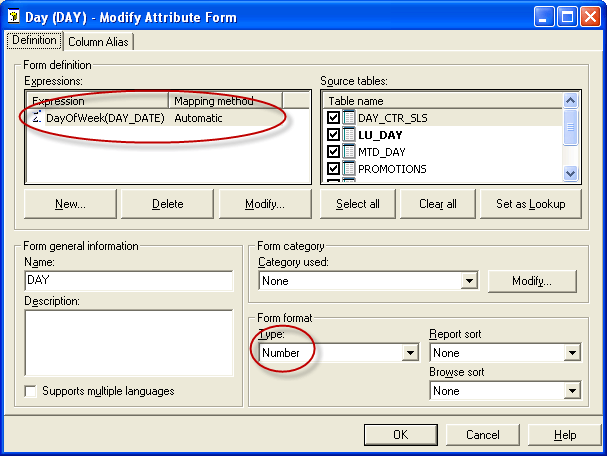
  1. Create a attribute form for 'Day' attribute using Strategy built-in function 'DayOfWeek' to indicate what day is it. The function 'DayOfWeek' will return an integer value which '1' means 'Sunday', '2' means 'Monday' and so forth. Note that the form format is 'Number'.
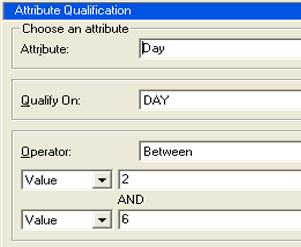
  2. Create a filter to filter out the weekend, qualify on the 'Day' attribute using the newly created attribute form and put the value between '2' to '6' to include only 'Monday' to 'Friday'
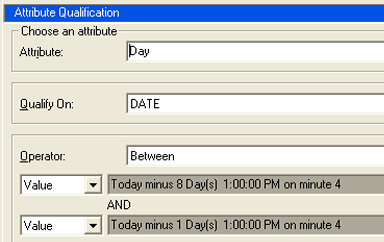
  3. Create another filter to show the dynamic date for last 7 days as shown in the following image:
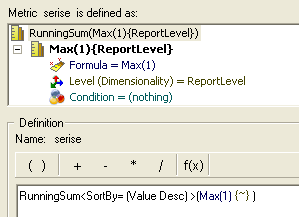
  4. Create a metric to generates series as 1,2,3 etc using the expression 'RunningSum(Max(1))'
  5. Create one more filter to quality on the metric value when it is "greater than or equal to 3" for this example.
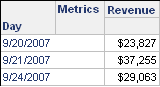
  6. Create a report with 'Day' attribute and those newly created filters. Now if today is 9/25/2007 which is Tuesday and run the report the following days displayed '9/24/2007', '9/21/2007' and '9/20/2007'.


ka02R000000kbjnQAA_0EM440000002EGQ.png

Comment

0 comments

Details

Knowledge Article

Published:

June 9, 2017

Last Updated:

June 9, 2017