EducationSoftwareStrategy.com
StrategyCommunity

Knowledge Base

Product

Community

Knowledge Base

TopicsBrowse ArticlesDeveloper Zone

Product

Download SoftwareProduct DocumentationSecurity Hub

Education

Tutorial VideosSolution GalleryEducation courses

Community

GuidelinesGrandmastersEvents
x_social-icon_white.svglinkedin_social-icon_white.svg
Strategy logoCommunity

© Strategy Inc. All Rights Reserved.

LegalTerms of UsePrivacy Policy
  1. Home
  2. Topics

KB318557: Validation of a formula in a derived metric in Visual Insight removes spaces if using a Case function.


Community Admin

• Strategy


SUMMARY:
This issue has been classified as a defect by Strategy.  A workaround is available in the current document. A solution/code fix for this issue is not available in current releases but has been scoped for a future Strategy release.
SYMPTOM:
After saving a derived metric in a Visual Insight dashboard, if the formula uses the Case function, the spaces between the attribute form and the IN word disappears and as such the formula cannot be validated correctly.

ka04W000000Of3UQAS_0EM4400000025NW.jpeg


Validation failed with syntax error!

(Attribute form specified with an attribute was not found among the attribute’s forms)

STEPS TO REPRODUCE:
 

  1. Create a new VI dashboard using the Intelligent Cube "Intelligent Cube – Income Bracket" from Tutorial (under Public Objects\Reports\Strategy Platform Capabilities\Strategy OLAP Services\Intelligent Cubes and View Reports).
  2. Create new metric and use the following formula:

SUM(CASE([Income Bracket]@DESC IN ("Over 100K"), [Cost], 0))
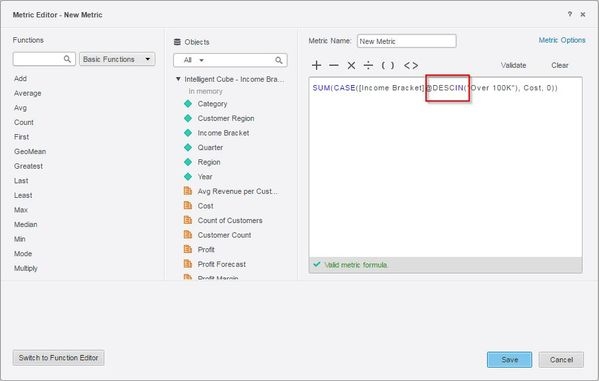
  1. Validate and save the metric.
  2. Notice the space between the word DESC and IN disappears.


ka04W000000Of3UQAS_0EM4400000025Nd.jpeg
  1. Open the metric again and try to validate the formula without making any changes, notice the formula will not validate correctly due to the space missing.

CAUSE:
This is a known issue in Strategy Web 10.4 and above.
ACTION:
This issue has been fixed in Strategy 10.8.
WORKAROUND:
Add the space manually for the formula to validate correctly.


Comment

0 comments

Details

Knowledge Article

Published:

June 12, 2017

Last Updated:

June 12, 2017