EducationSoftwareStrategy.com
StrategyCommunity

Knowledge Base

Product

Community

Knowledge Base

TopicsBrowse ArticlesDeveloper Zone

Product

Download SoftwareProduct DocumentationSecurity Hub

Education

Tutorial VideosSolution GalleryEducation courses

Community

GuidelinesGrandmastersEvents
x_social-icon_white.svglinkedin_social-icon_white.svg
Strategy logoCommunity

© Strategy Inc. All Rights Reserved.

LegalTerms of UsePrivacy Policy
  1. Home
  2. Topics

KB31867: How to enable Administrative Notifications on delivery failure with MicroStrategy Developer 9.x and 10.x


Stefan Zepeda

Salesforce Solutions Architect • Strategy


How to enable Administrative Notifications on delivery failure with MicroStrategy Developer 9.x and 10.x

 
To configure delivery notification e-mail messages with Strategy Distribution Services 9.x and 10.x deliveries, the following steps are required:
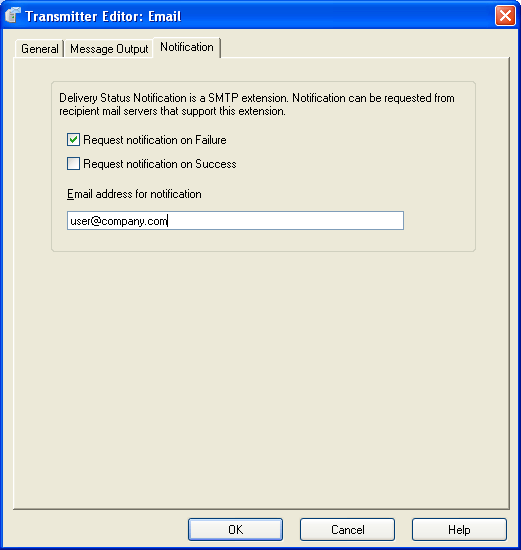
  • In Strategy Developer, go to the Administration > Delivery Managers > Transmitters section and edit the Email Transmitter.
  • In the Notification tab, check the “Request notification on Failure” option and specify a valid e-mail address. This address will serve as the recipient for the notification e-mail:
     
ka0PW0000002rY5YAI_0EM440000002Ax8.png
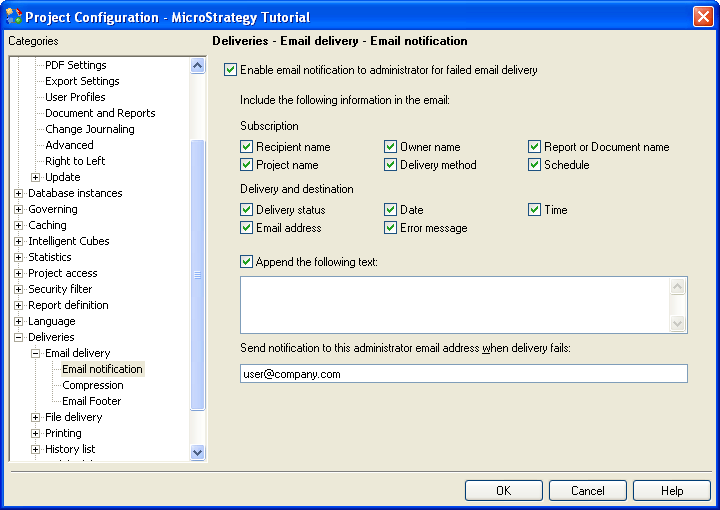
  • Go to the Project Configuration section, Deliveries > Email Delivery > Email notification page, and specify the desired fields to be included in the notification messages. Additionally, specify the e-mail address of the notification e-mail recipient:
ka0PW0000002rY5YAI_0EM440000002Ax7.png

NOTE: To specify multiple email addresses, separate the addresses with a semi-colon (;). Example: user1@company.com; user2@company.com
 
For more information on how to configure e-mail notification messages on failure on Strategy Narrowcast Server 9.x, please refer to the following Strategy Knowledge Base technical document:
 
KB16744  How to setup Administrative Notification to send to multiple email addresses in Strategy Narrowcast Server 9.x.


411333


Comment

0 comments

Details

Knowledge Article

Published:

June 3, 2017

Last Updated:

July 31, 2024