SUMMARY:
This Technical Note describes an issue where the Service Principle Name (SPN) field is greyed out for Kerberos Authentication mode when creating a DSN using the Strategy Apache Spark SQL ODBC Driver in the Windows Data Sources (ODBC) Administrator.
SYMPTOM:
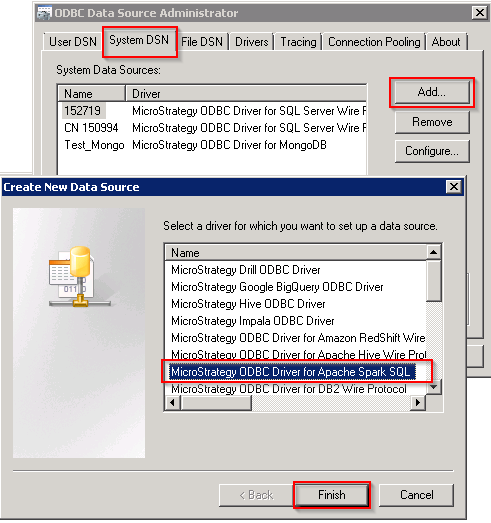
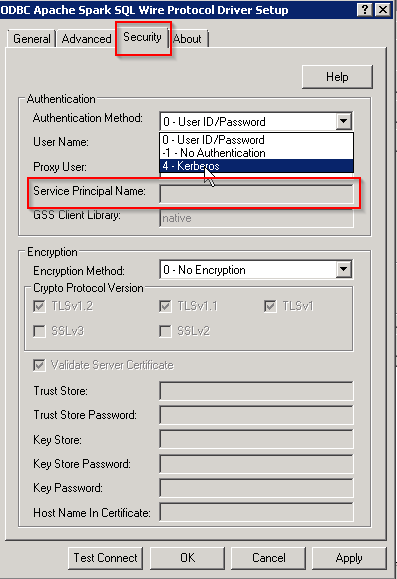
In Strategy 10.4 and higher, when creating a DSN using the Strategy ODBC Driver for Apache Spark SQL in the Windows Data Sources (ODBC) administrator, the Service Principle Name text field is greyed out when using the Kerberos authentication method.
STEPS TO REPRODUCE:
Follow these steps to reproduce the issue in a Strategy Tutorial Environment.
CAUSE:
This is an identified defect by Strategy in the GUI for the current driver we ship on Windows.
ACTION:
This issue has been rectified in Strategy 10.7. Please upgrade to this version to take advantage of a fix or follow the workaround below.
WORKAROUND:
To work around this issue, navigate to the Advanced Tab and set the SPN as part of the Extended Options field. For example, in this section simply add SPN=Service_Name/Fully_Qualified_Domain_Name@REALM.COM.
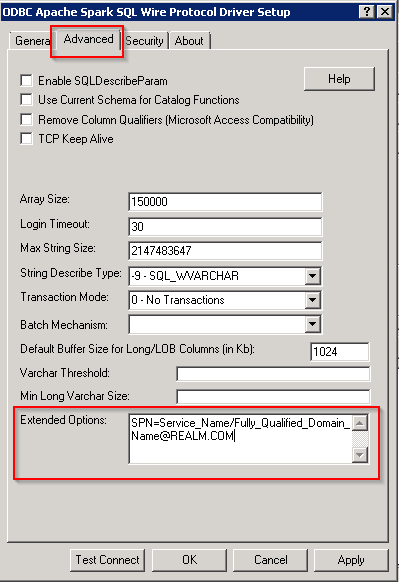
Figure 3: Set the SPN as part of the Extended Options in the Advantage Tab.
KB318709
