Sample Code/Error
SYMPTOM:
The following error occurs when attempting to start a Strategy Intelligence Server 9.x from the Strategy Service Manager:

Sample Code/Error
Failed to start service
Unexpected error occurred. The dependency service or group failed to start.
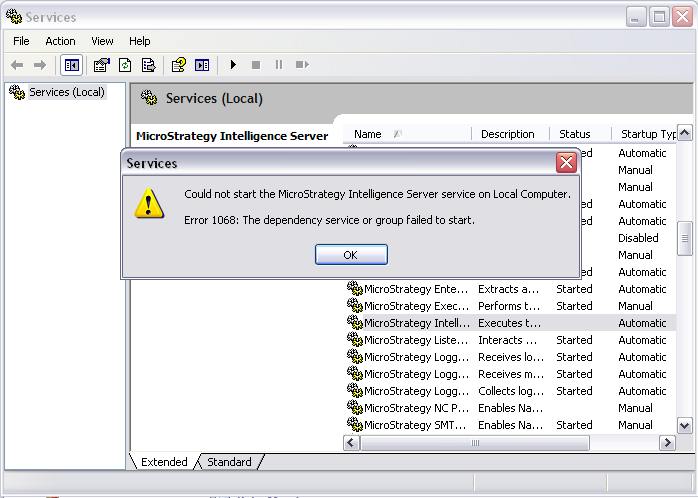
When attempting to start the Strategy Intelligence Server 9.x from the Microsoft Windows Service Manager, a similar error message occurs:
Sample Code/Error
Could not start the Strategy Intelligence Server service on Local Computer.
Error 1068: The dependency service or group failed to start.
Additionally, the following error is logged in the Event Viewer System log:

Sample Code/Error
The Strategy Intelligence Server service depends on the Net Logon service which failed to start because of the following error:
The service cannot be started, either because it is disabled or because it has no enabled devices associated with it.
CAUSE:
A possible cause is that the the Net Logon service is disabled or was not able to start. The Net Logon service is a dependent service for the Strategy Intelligence Server 9.x
ACTION:
Open the Microsoft Windows Service Manager and locate the Net Logon Service, as shown below:
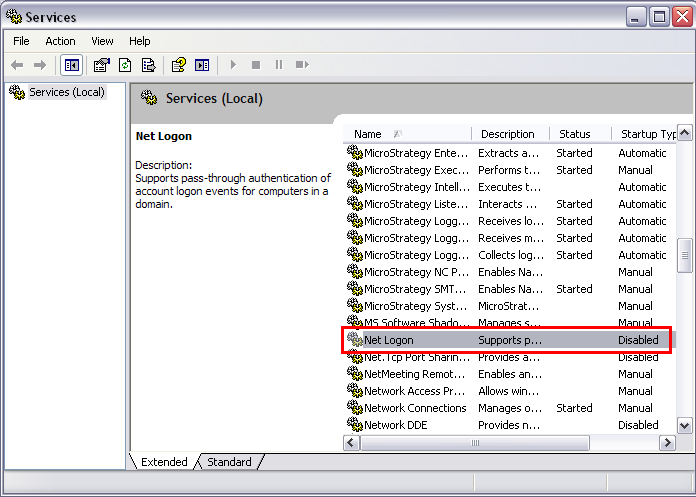
Right click on the Net Logon service and click on Properties. Choose the "Automatic" Start up type, and start the service:

