EducationSoftwareStrategy.com
StrategyCommunity

Knowledge Base

Product

Community

Knowledge Base

TopicsBrowse ArticlesDeveloper Zone

Product

Download SoftwareProduct DocumentationSecurity Hub

Education

Tutorial VideosSolution GalleryEducation courses

Community

GuidelinesGrandmastersEvents
x_social-icon_white.svglinkedin_social-icon_white.svg
Strategy logoCommunity

© Strategy Inc. All Rights Reserved.

LegalTerms of UsePrivacy Policy
  1. Home
  2. Topics

KB31892: "'Failed to start service. Unexpected error occurred. The dependency service or group failed to start" error message appears when trying to start MicroStrategy Intelligence Server 9.x and 10.x


Community Admin

• Strategy


"'Failed to start service. Unexpected error occurred. The dependency service or group failed to start" error message appears when trying to start MicroStrategy Intelligence Server 9.x and 10.x

SYMPTOM:
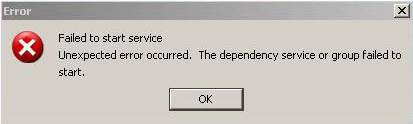
The following error occurs when attempting to start Strategy Intelligence Server 9.x  and 10.x from the Strategy Service Manager, as shown below:
 

ka04W000000Obc6QAC_0EM440000002AxI.png


Failed to start service
Unexpected error occurred. The dependency service or group failed to start.
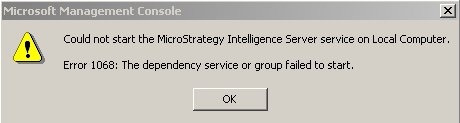
 
When attempting to start Strategy Intelligence Server 9.x from the Microsoft Windows Service Manager a similar error message may be seen, as shown below:
 

ka04W000000Obc6QAC_0EM440000002AxM.jpeg


Could not start the Strategy Intelligence Server service on Local Computer
Error 1068: The dependency service or group failed to start.

  
CAUSE:
Normally, the Strategy Intelligence Server service depends on three services:

  • Remote Procedure Call (RPC)
  • Protected Storage
  • NT LM Security Support Provider

(Note: On  Strategy Intelligence Server machine, go to Administrative Tools -> Services, open the Microsoft Services window and locate the Strategy Intelligence Server service. Click Dependencies tab, the above 3 dependencies are listed.)
 
One (or more) of the above fail to start. This is likely the case if the service is disabled or stopped in a manner that requires a manual restart. If this dependent service for the Intelligence Server is not running, the Intelligence Server will not start.
 
ACTION:
Startup the dependent service for the Intelligence Server that is not running. Take the NT LM Security Support Provider Service as an example:
 
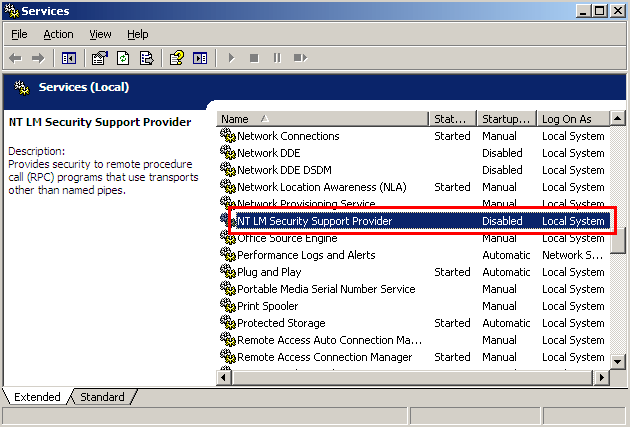
On Strategy Intelligence Server machine, go to Administrative Tools -> Services, open the Microsoft Services window and located the NT LM Security Support Provider Service, as shown below:
 

ka04W000000Obc6QAC_0EM440000002AxK.png

 
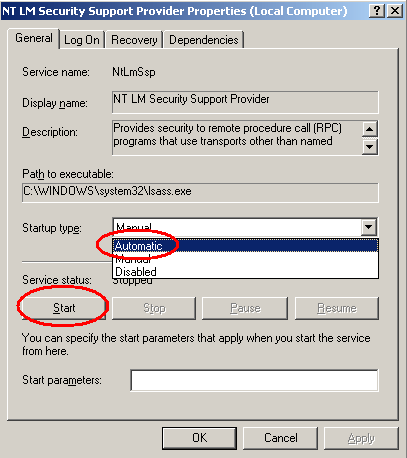
Right-click on the NT LM Security Support Provider Service and select 'Properties'. Under the 'General' tab, under the 'Startup type' choose 'Automatic' to enable the service. Start up the service by clicking the 'Start' button then click 'OK' to save the changes, as shown below:
 

ka04W000000Obc6QAC_0EM440000002AxN.png


Comment

0 comments

Details

Knowledge Article

Published:

May 29, 2017

Last Updated:

May 29, 2017