SYMPTOM:
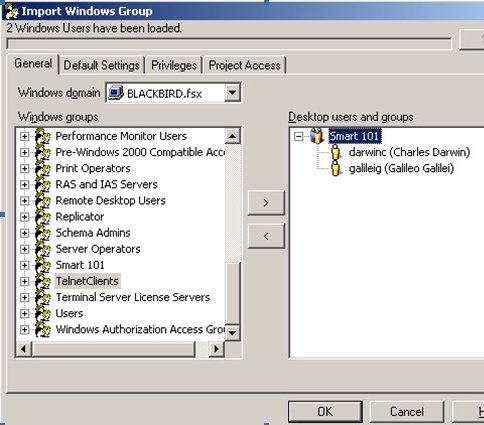
Users attempting to use the Import Windows Group functionality of Strategy Desktop to import the users belonging to a group in Active Directory may find that for some groups - specifically Universal Distribution Groups in Active Directory, not all members of the group are imported into Strategy. Screen shots for the the user group membership displayed in the import wizard and the Active Directory Group are shown below. The users that belong to the group and are not displayed in the Import Windows Group interface, belong to a different trusted domain than the one specified in the Windows Domain drop down list box.

CAUSE:
This issue is caused because the Import Windows Group functionality selects the users from Active Directory based on the domain selected in the drop down list box. So users from more than one domain belonging to the same group cannot be imported together. Also, since the group is only present in one Active Directory domain, selecting a different domain in the drop down list does not display the group.
ACTION:
This issue has been logged to be addressed in a future release. Contact Strategy Technical Support for an update on this issue.
Third Party Software Installation WARNING
The third-party product(s) discussed in this technical note is manufactured by vendors independent of Strategy. Strategy makes no warranty, express, implied or otherwise, regarding this product, including its performance or reliability.
