EducationSoftwareStrategy.com
StrategyCommunity

Knowledge Base

Product

Community

Knowledge Base

TopicsBrowse ArticlesDeveloper Zone

Product

Download SoftwareProduct DocumentationSecurity Hub

Education

Tutorial VideosSolution GalleryEducation courses

Community

GuidelinesGrandmastersEvents
x_social-icon_white.svglinkedin_social-icon_white.svg
Strategy logoCommunity

© Strategy Inc. All Rights Reserved.

LegalTerms of UsePrivacy Policy
  1. Home
  2. Topics

KB31904: How to create a prompt that lists elements existing in a fact table within MicroStrategy 9.4.1 and 10.x.


Stefan Zepeda

Salesforce Solutions Architect • Strategy


A report designer may need to define a prompt that lists elements exists in a specific fact table. The following is an example to approach this requirement using the MicroStrategy Tutorial project.

SYMPTOM:
A report designer may need to define a prompt that lists elements exists in a specific fact table. The following is an example to approach this requirement using the Strategy Tutorial project.
 
STEPS TO REPRODUCE:
Create a prompt that list all the Category attribute elements exist in YR_CATEGORY_SLS table.
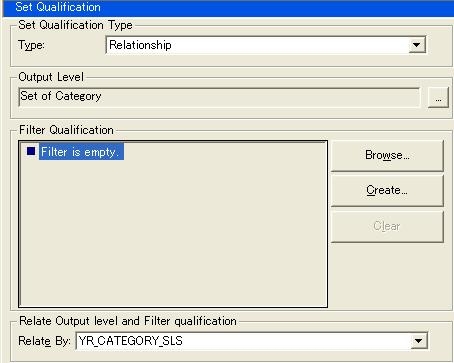
  • Within the Tutorial Project, create a new set qualification filter and save as “Categories from YR_CATEGORY_SLS”.
    • Type: Relationship
    • Output Level: Set of Category
    • Relate By: YR_CATEGORY_SLS
ka02R000000kVkDQAU_0EM440000002EGK.jpeg
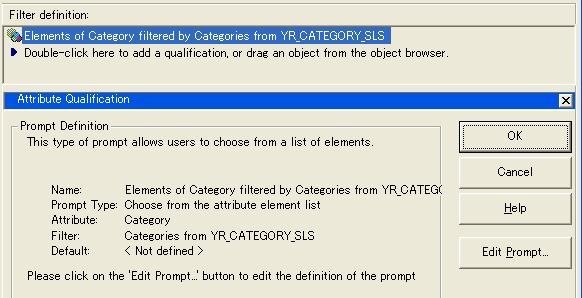
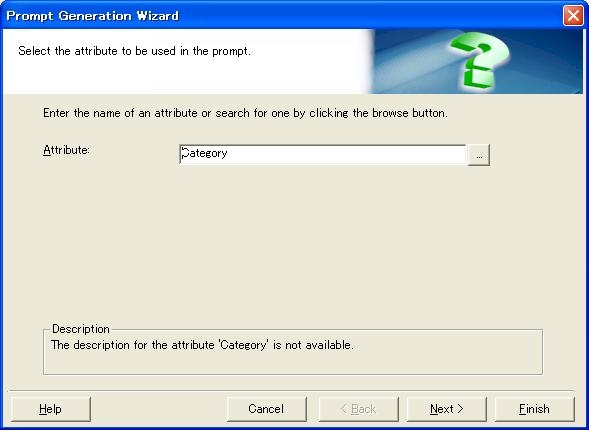
  • Create a new attribute qualification filter and select Category as the attribute.
  • In the filter editor, define a prompt to list Category elements, and use the filter created in step 1 to reduce the number of elements.
ka02R000000kVkDQAU_0EM440000002EGF.jpeg
  • Save it as “Categories filtered by YR_CATEGORY_SLS” and close the filter editor.
    This is the prompt filter that list Category elements from YR_CATEGORY_SLS.
ka02R000000kVkDQAU_0EM440000002EGD.jpeg
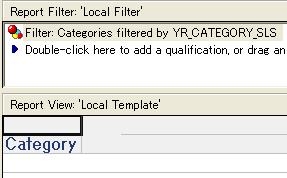
  • When a report with the following definition is executed, the prompt doesn’t display elements that exist only in LU_CATEGORY.
ka02R000000kVkDQAU_0EM440000002EGC.jpeg
  •  

    Here is a SQL trace for warehouse when rendering prompt elements. By joining YR_CATEGORY_SLS, an element exists only in lookup table gets excluded.


    select  count(a21.CATEGORY_ID)  WJXBFS1
    from    LU_CATEGORY a21
    where   ((a21.CATEGORY_ID)
     in (select r11.CATEGORY_ID
        from    YR_CATEGORY_SLS r11))
           
    select  a11.CATEGORY_ID  CATEGORY_ID,
        a11.CATEGORY_DESC  CATEGORY_DESC0
    from    LU_CATEGORY a11
    where   ((a11.CATEGORY_ID)
     in (select r11.CATEGORY_ID
        from    YR_CATEGORY_SLS r11))
    order by        1 asc


Comment

0 comments

Details

Knowledge Article

Published:

May 25, 2017

Last Updated:

May 25, 2017