EducationSoftwareStrategy.com
StrategyCommunity

Knowledge Base

Product

Community

Knowledge Base

TopicsBrowse ArticlesDeveloper Zone

Product

Download SoftwareProduct DocumentationSecurity Hub

Education

Tutorial VideosSolution GalleryEducation courses

Community

GuidelinesGrandmastersEvents
x_social-icon_white.svglinkedin_social-icon_white.svg
Strategy logoCommunity

© Strategy Inc. All Rights Reserved.

LegalTerms of UsePrivacy Policy
  1. Home
  2. Topics

KB319061: Subscriptions are missing after duplicating a project between environments in MicroStrategy Developer 10.x


Stefan Zepeda

Salesforce Solutions Architect • Strategy


This article discusses an issue where subscriptions are marked invalid and deleted after duplicating a project to another metadata in MicroStrategy Developer 10.x.

SUMMARY
This article discusses an issue where subscriptions are marked invalid and deleted after duplicating a project to another metadata in Strategy Developer 10.x.
 
SYMPTOM
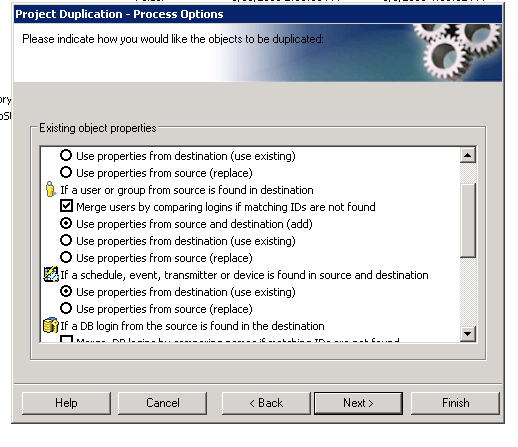
After doing Project Duplication with the options for duplicating all users and choosing to merge users by login, subscriptions are being marked invalid and deleted for some of the users. 
 
CAUSE
This is a known defect In Strategy 10.x when duplicating users between environments where they have the same login but different object IDs. When duplicating the project from source to destination, if the option to "Merge Users by comparing logins if matching IDs are not found" is used, then the users meeting this criteria will have their User object merged in the destination so there is not a duplicate object.  However, the subscription which was also duplicated, is still referencing the original user ID which does not exist in the destination due to merging of the users.  A Strategy subscription which references a user ID that does not exist will be marked invalid and eventually deleted.
 

ka02R000000kZk7QAE_0EM440000002Bzl.jpeg

ACTION
Please contact Strategy Technical Support for an update on this issue.
 
WORKAROUND

  1. Creating a new project at the Source environment called P1.
  2. Duplicate this new empty project P1 from the Source to the Destination environment, selecting in the configuration ONLY the affected user and the ADD Option. This creates a duplicate user at Destination: userLogin and userLogin1.
  3. At Destination, using User Merge, merge the new user "userLogin1" with the original user "userLogin", (in this order to avoid losing contacts).
  4. Manually modify the login name, from userLogin1 to userLogin (both Source and Destinition should now have "userLogin" with matching Object IDs).
  5. Duplicate the desired Source project normally. The subscriptions will be copied to Destination and kept valid.

 
This issue is tracked by internal reference number DE46947


Comment

0 comments

Details

Knowledge Article

Published:

June 8, 2017

Last Updated:

June 8, 2017