In Strategy Developer, users can adjust the order of operations in the Analytical Engine using the report data options dialog, under Calculations > Evaluation Order.
Two panels are shown: one for the Data Set and one for the View.
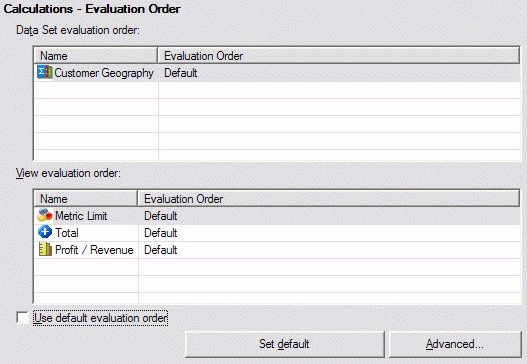
If a report uses OLAP Services features (dynamic aggregation, view filter, derived metrics), both panels might be active. Without any OLAP Services features, only the dataset evaluation order will be enabled.
Note: The "Use default evaluation order" checkbox must be deselected to activate the View evaluation order.
What are the Data Set and the View?
Every OLAP Services report contains two sets of data:
OLAP Services manipulations, such as pivoting attributes between the template and the Report Objects window, respond quickly because the base dataset is unaffected by any of these actions. The Analytical Engine simply recalculates the view dataset from the base data already retrieved from the database.
The dataset evaluation order refers to Analytical Engine operations that do not depend on OLAP Services features and which are calculated before producing the view data. The above illustration shows a consolidation calculated in the dataset. A consolidation rearranges the SQL results according to a predefined list of consolidation elements. The consolidation elements effectively replace the original attribute elements from the database for all subsequent report processing. Consequently, consolidations are always evaluated in the data set. (Evaluation order matters for consolidations because reports with two or more consolidations may return different results depending on which consolidation is evaluated first.)
The view evaluation order includes operations that make up the OLAP Services data presented to the user, typically smart compound metrics and derived metrics, subtotals, and metric limits in the view filter. The default evaluation order is discussed in the following Strategy Knowledgebase document.
KB11230: What is the "Evaluation Ordering" VLDB Property?
Moving units from view to dataset evaluation
The Advanced... button in the Evaluation Order dialog allows certain calculations to be performed in the dataset only.

This option is useful in cases where OLAP Services features are used, but a certain smart compound metrics must be calculated before one or more consolidations. For an example, see the following Strategy Knowledgebase document.
KB31911: Adding a view filter to a report that includes consolidations and smart compound metrics causes the metrics to calculate differently in Strategy Engine
KB31910
