SUMMARY
This Knowledge Base Article describes an issue with free form SQL reports that contain special characters in the custom SQL, this behavior has been observed in Strategy 10.5.
SYMPTOM
Free form SQL Reports that contain special characters in the custom SQL, fail with an execution error and the SQL View of the report does not show “SQL Statements”.
Example errors that could be seen in the DSSErrors.log are:
For DB2:
Error type: Odbc error. Odbc operation attempted: SQLExecDirect. [HY000:-198: on SQLHANDLE] [Strategy][ODBC DB2 Wire Protocol driver][UDB DB2 for iSeries and AS/400]OPERAND OF PREPARE OR EXECUTE IMMEDIATE STATEMENT BLANK OR EMPTY. For more information, please consult DB2 document for error code SQL0198.
Error type: Odbc error. Odbc operation attempted: SQLExecDirect. [HY009:70: on SQLHANDLE] [Microsoft][ODBC Microsoft Access Driver]Invalid use of null pointer
2016-10-27 17:48:40.707 [HOST:xxx][SERVER:][PID:xxx][THR:xxx][Query Engine][Error][0x80042300] QueryEngine encountered error: Execute Query failed.
Error type: Odbc error. Odbc operation attempted: SQLExecDirect. [HY009:70: on SQLHANDLE] .
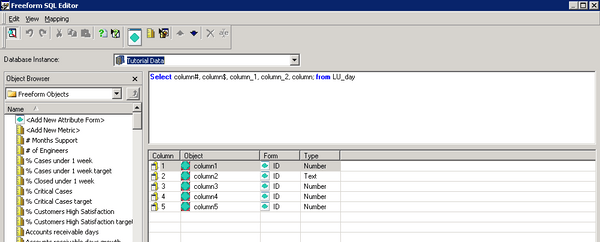
For this test the following SQL statement is used: Select column#, column$, column_1, column_2, column; from LU_day
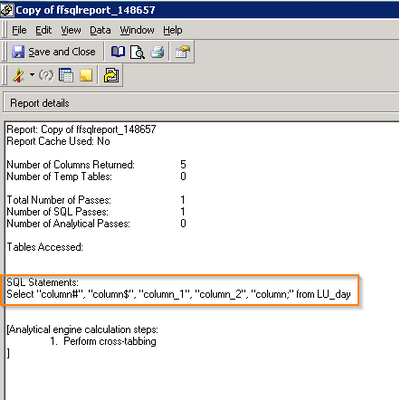
2. Run the report and select the SQLview in 10.4 for the Report. The SQL statement is shown, as it’s seen in the image below:

In Strategy Developer 10.5
3. Create a Free form SQL report, you can use the same SQL Statement:
Select column#, column$, column_1, column_2, column; from LU_day;

5. Run SQLView for the Free form SQL report created before. Note how no SQL statement is shown:

CAUSE:
This has been identified as a defect in Strategy Developer 10.5
ACTION:
This issue has been fixed in Strategy 10.7.
WORKAROUND:

Select "column#", "column$", "column_1", "column_2", "column;" from LU_day;