EducationSoftwareStrategy.com
StrategyCommunity

Knowledge Base

Product

Community

Knowledge Base

TopicsBrowse ArticlesDeveloper Zone

Product

Download SoftwareProduct DocumentationSecurity Hub

Education

Tutorial VideosSolution GalleryEducation courses

Community

GuidelinesGrandmastersEvents
x_social-icon_white.svglinkedin_social-icon_white.svg
Strategy logoCommunity

© Strategy Inc. All Rights Reserved.

LegalTerms of UsePrivacy Policy
  1. Home
  2. Topics

KB31916: How to display row numbers in one column on the report in MicroStrategy Developer 9.4.x-10.x?


Stefan Zepeda

Salesforce Solutions Architect • Strategy


This knowledge base article explains how to display row numbers in one column on the report in MicroStrategy Developer 9.4.x-10.x.

Follow the steps below to display row numbers in one column on the report in Strategy Developer 9.4.x-10.x:
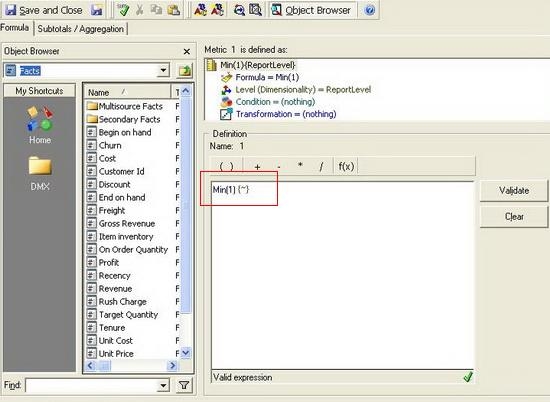
  •  Create a metric called A with expression  "Min(1){~}" as shown below. This metric is used for getting "1" value for all rows.
     
ka02R000000kcOLQAY_0EM440000002EDd.jpeg
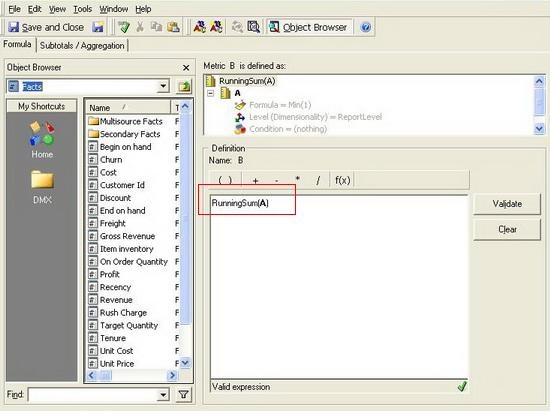
  • Create a compound metric called B with expression "RunningSum(A)" as shown below. "A" in the expression is the metric created in step 1. This metric is used for getting "1,2,3,4,..." values for rows.
ka02R000000kcOLQAY_0EM440000002EDa.jpeg
  • Highlight "RunningSum" in Metric Editor, right click on it and select "RunningSum Parameters", as shown below:
ka02R000000kcOLQAY_0EM440000002EDc.jpeg
  • Under "Sort By" tab,select "Sort by objects" and add all the attributes on the report in order of left to right, as shown below:
     
ka02R000000kcOLQAY_0EM440000002EDQ.jpeg
  • Add metric B to the report and run the report, as shown below:
     
ka02R000000kcOLQAY_0EM440000002EDZ.jpeg
  •               Metric B displays row numbers of the report.

 
NOTE: An enhancement request has been logged for automatic row numbering in reports. Contact Strategy Technical Support for an update on this request.


Comment

0 comments

Details

Knowledge Article

Published:

April 28, 2017

Last Updated:

April 28, 2017