EducationSoftwareStrategy.com
StrategyCommunity

Knowledge Base

Product

Community

Knowledge Base

TopicsBrowse ArticlesDeveloper Zone

Product

Download SoftwareProduct DocumentationSecurity Hub

Education

Tutorial VideosSolution GalleryEducation courses

Community

GuidelinesGrandmastersEvents
x_social-icon_white.svglinkedin_social-icon_white.svg
Strategy logoCommunity

© Strategy Inc. All Rights Reserved.

LegalTerms of UsePrivacy Policy
  1. Home
  2. Topics

KB319255: Strikethrough appears for checkbox selections and can not be removed when the attribute element amount is large in MicroStrategy Web 10.4


Community Admin

• Strategy


This technical note describes an issue where strikethrough appears for checkbox selections and can not be removed when the attribute element amount is large in MicroStrategy Web 10.4. This is an identified defect in MicroStrategy Web 10.4.

SYMPTOM:
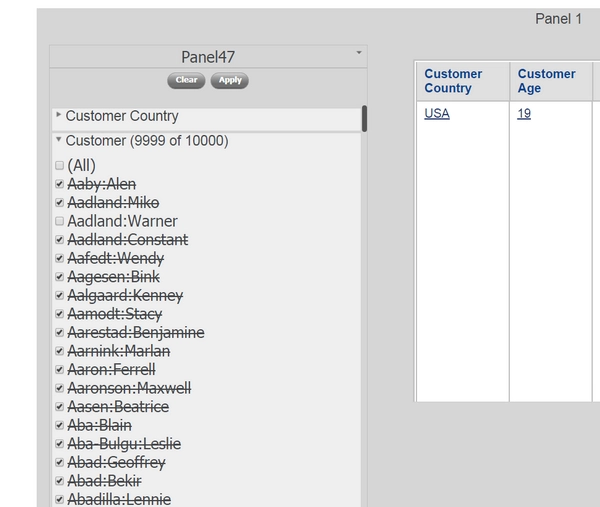
Strikethrough appears for checkbox selections and can not be removed when the attribute element amount is large in Strategy Web 10.4GA.
Follow the steps below to reproduce the issue in Tutorial project:
  • Create a document on Customer attribute and also some other objects
  • Insert a filter panel and insert the Customer selector as checkbox selector
  • Run in presentation mode. First check all in Customer then uncheck any single element. Notice that all other selected elements have one strikethrough, which didn't make sense.
ka04W000000ObWTQA0_0EM4400000025Pr.jpeg

CAUSE:
This is a known issue with Strategy Web 10.4GA.
ACTION:
The issue is addressed in Strategy 10.8 and in 10.4 HF2.
The Strategy Internal Reference Number for the issue discussed in this technical note is DE49732.
KB319255


Comment

0 comments

Details

Knowledge Article

Published:

June 7, 2017

Last Updated:

September 21, 2018