BACKGROUND
Session Recovery is a feature added in Strategy that allows logged out Strategy Web users to log back in and recover the last dashboard, document, or report viewed before the session ended. For more information about the use of the Session Recovery feature, see KB302259: What is the Session Recovery feature in MicroStrategy 10.x and how does it work?
In a clustered Intelligence Server environment, additional configuration is required for the cluster nodes to be able to share Session Recovery functionality for sessions that existed on other cluster nodes. This configuration is similar to the configuration required to share caches, cubes, and history list messages. The repository can be located either local to each cluster node, or central in a shared network location. This technical note will cover the configuration steps required for both configuration options.
LOCALIZED STORAGE
In localized storage, each cluster node will retain the recovery files for sessions hosted by that node. The file location will be shared to the other cluster nodes so that each node can access other node's recovery files. When the Intelligence Server is running on Windows, this is accomplished via shared folders. When the Intelligence Server is running on Linux/UNIX, this is accomplished via filesystem mounts. Regardless of the OS, the directory to be shared is the one set as "Session Recovery and Deferred Inbox storage directory" in the "Strategy Intelligence Server Configuration > Governing Rules > Default > Temporary Storage Settings" dialog box. By default this will be set to the same location as History List file storage.
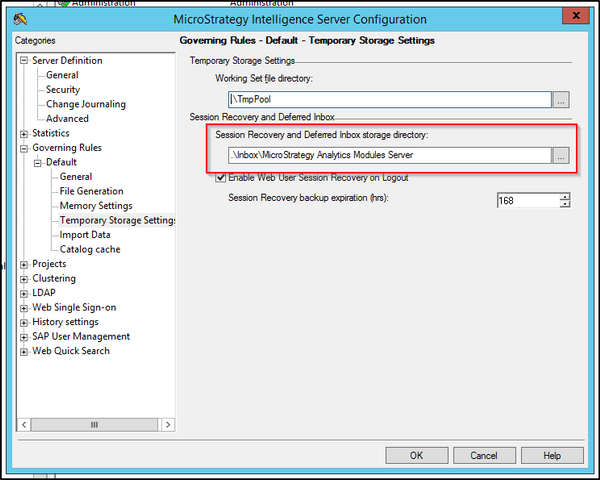
Windows
The above location should be shared with the name "ClusterWSRM". This name is hard-coded and must be set as the share name for the other nodes to be able to access it. The domain user running the remote Intelligence Server(s) must have full read and write access to this shared location.
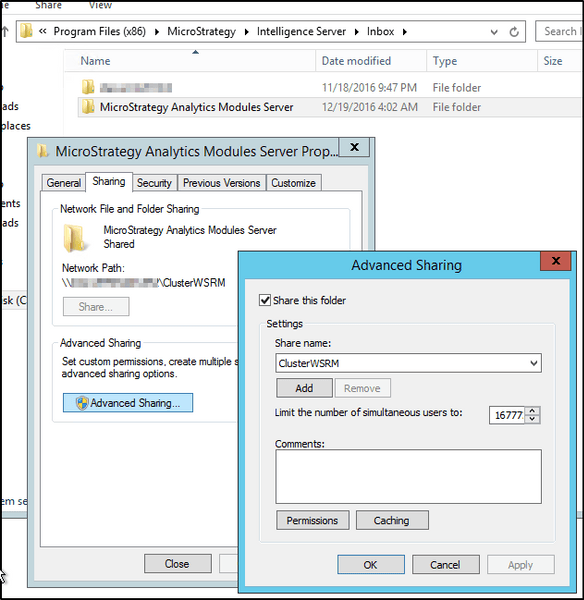
Linux/UNIX
The above location should be shared, and mounted from the other Intelligence Server nodes. The local mount point should be /machinename/ClusterWSRM. So, in a two node cluster with machines named NodeA and NodeB, NodeA should have NodeB's directory mounted on /NodeB/ClusterWSRM, and NodeB should have NodeA's directory mounted on /NodeA/ClusterWSRM. The Linux/UNIX user running the Intelligence Servers must have full read and write access on the mounted location.
CENTRALIZED STORAGE
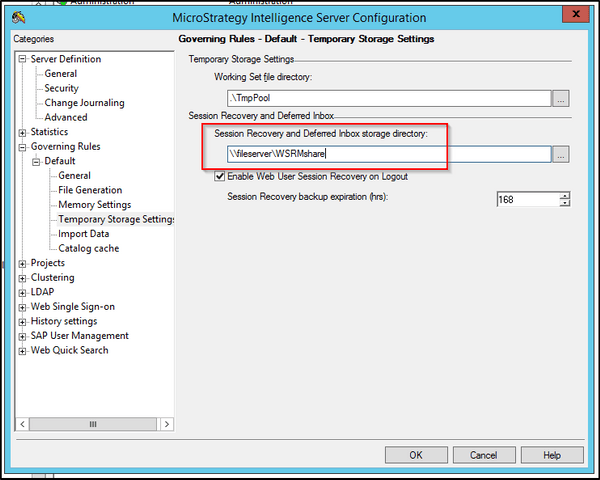
In centralized storage, all cluster nodes will store their repository files in a central shared network location. This location will need to be set as "Session Recovery and Deferred Inbox storage directory" in the "Strategy Intelligence Server Configuration > Governing Rules > Default > Temporary Storage Settings" dialog box.
Windows
The shared location should be set up ahead of time and must be accessible by the domain user running the Intelligence Servers via a Universal Naming Convention (UNC) path, in the format of \\machinename\path. The domain user running the remote Intelligence Server(s) must have full read and write access to this shared location.
Linux/UNIX
The shared location should be set up ahead of time and must be mounted to the local filesystem on each of the Intelligence Server machines rather than referenced with a UNC path. The path of the mount point does not matter, but whatever is used as the path must be entered in the configuration dialog box.
NOTE: Even though this path is a local path and not a UNC path, double slashes must still be used in the dialog box to signify to the Strategy Intelligence Server that centralized storage is in use. Either backslashes or forward slashes may be used; the Intelligence Server will automatically convert the path to a usable format.

