EducationSoftwareStrategy.com
StrategyCommunity

Knowledge Base

Product

Community

Knowledge Base

TopicsBrowse ArticlesDeveloper Zone

Product

Download SoftwareProduct DocumentationSecurity Hub

Education

Tutorial VideosSolution GalleryEducation courses

Community

GuidelinesGrandmastersEvents
x_social-icon_white.svglinkedin_social-icon_white.svg
Strategy logoCommunity

© Strategy Inc. All Rights Reserved.

LegalTerms of UsePrivacy Policy
  1. Home
  2. Topics

KB319469: There are double quotes in each field when opened in text editors when exporting to a CSV file in MicroStrategy Narrowcast 10.x


Community Admin

• Strategy


SYMPTOM
In Narrowcast, Information Objects that return XML are formatted using XSL stylesheets.  The default stylesheet used to format CSV files (called MSTR7ToText-CSV.xsl) includes double quotes around each cell.  Strategy provides additional stylesheets which can be used to format CSV files; one of these stylesheets is called MSTR7ToText-CSV-NoDoubleQuotes.xsl.  This stylesheet is supposed to remove the double quotes around each cell. However, in Strategy Narrowcast 10.x, this stylesheet does not successfully remove the double quotes.
 
STEPS TO REPRODUCE
  • Create a Grid report .  
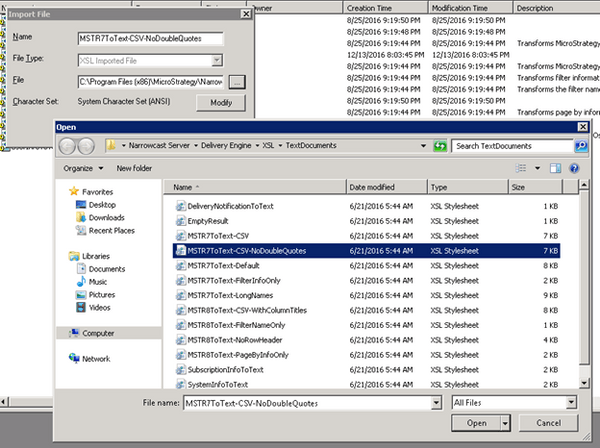
  • Import the MSTR7ToText-CSV-NoDoubleQuotes.xsl stylesheet.  Right-click and choose New > Imported File.  Browse to the correct file.
     
ka04W000000OeYMQA0_0EM44000000299e.jpeg
  •  The default path for the XSL file is C:\Program Files (x86)\Strategy\Narrowcast Server\Delivery Engine\XSL\TextDocuments\MSTR7ToText-CSV-NoDoubleQuotes.xsl.
     
  • Create a new plaintext document in Narrowcast, and insert an Information Object which points to the grid report created in Step 1.
     
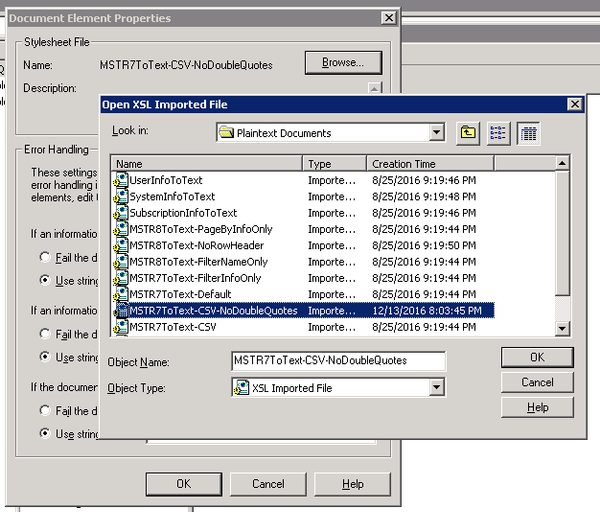
  • Right-click the Information Object and choose “Edit Document Element”.  Click “Browse” and navigate to the XSL stylesheet from step 2.
ka04W000000OeYMQA0_0EM44000000299V.jpeg
  • Create a Service in Narrowcast which uses the Narrowcast document created in step 3.  
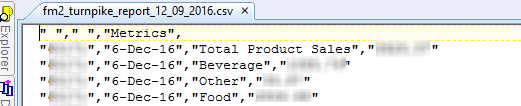
  • In a plain text editor, the values show up in double quotes:
ka04W000000OeYMQA0_0EM44000000299g.jpeg

 
CAUSE
This is an identified defect in Strategy 10.x with the MSTR7ToText-CSV-NoDoubleQuotes.xsl stylesheet.
 
WORKAROUND
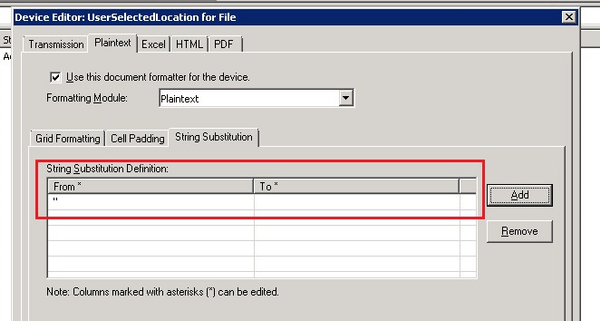
Create a new device or edit the current device. On the Plaintext tab, go to the String Substitution tab. Set up a string substitution to replace double quotes with nothing, as shown here:
ka04W000000OeYMQA0_0EM44000000299h.jpeg

 
The double quotes do not show up when opened in Excel.
 
The Strategy internal reference number for this issue is DE52126.


Comment

0 comments

Details

Knowledge Article

Published:

June 8, 2017

Last Updated:

June 8, 2017