EducationSoftwareStrategy.com
StrategyCommunity

Knowledge Base

Product

Community

Knowledge Base

TopicsBrowse ArticlesDeveloper Zone

Product

Download SoftwareProduct DocumentationSecurity Hub

Education

Tutorial VideosSolution GalleryEducation courses

Community

GuidelinesGrandmastersEvents
x_social-icon_white.svglinkedin_social-icon_white.svg
Strategy logoCommunity

© Strategy Inc. All Rights Reserved.

LegalTerms of UsePrivacy Policy
  1. Home
  2. Topics

KB319486: <DELETED DOCUMENT> appears frequently in custom Enterprise Manager reports using the Document attribute in MicroStrategy 10.4


Community Admin

• Strategy


This Technical Note documents an issue that may be seen on some custom Enterprise Manager reports using the Document attribute. This issue has been fixed in MicroStrategy 10.6.

SUMMARY
This Technical Note documents an issue that may be seen on some custom Enterprise Manager reports using the Document attribute. This issue has been fixed in Strategy 10.6.
 
SYMPTOM
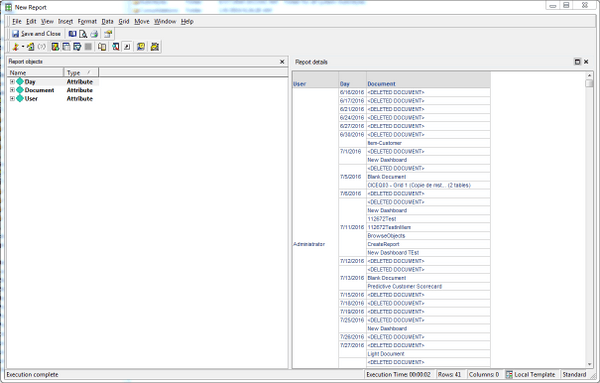
On certain Enterprise Manager reports using the Document attribute, <DELETED DOCUMENT> occurs as a document name much more than would be reasonably expected based on what is known about the usage pattern and objects developed in the user's Strategy environment.
 

ka04W000000OelbQAC_0EM44000000299G.jpeg

 
The report SQL may include a join with the IS_REP_FACT table even if the report template does not use any attributes or metrics that would require this table. For example, here is SQL for the report above:


select distinct a12.EM_USER_ID EM_USER_ID,
 a14.EM_USER_NAME EM_USER_NAME,
 a12.DAY_ID2 DT_DAY_DATE,
 a12.IS_DOC_ID IS_DOC_ID,
 a13.IS_DOC_NAME IS_DOC_NAME
from IS_REP_FACT a12
 join IS_DOC a13
 on (a12.IS_DOC_ID = a13.IS_DOC_ID)
 join EM_USER_VIEW a14
 on (a12.EM_USER_ID = a14.EM_USER_ID)

 
STEPS TO REPRODUCE
Create and and execute a report in the Enterprise Manager project with the attributes User, Day, Document. Depending on the data present in Enterprise Manager repository, the report may show more entries with <DELETED DOCUMENT> than expected.
 
CAUSE
The document attribute before 10.6 has a reference to the IS_REP_FACT table, so combinations of certain attributes lead to a join between IS_REP_FACT table and IS_DOC table. The report then pulls data about report jobs with no associated document, which are displayed as "Deleted Document" because the code for "Deleted Document" is the same as the code for report job with no associated document.
 
ACTION
This known issue has been addressed in Strategy 10.6.


Comment

0 comments

Details

Knowledge Article

Published:

June 7, 2017

Last Updated:

June 7, 2017