EducationSoftwareStrategy.com
StrategyCommunity

Knowledge Base

Product

Community

Knowledge Base

TopicsBrowse ArticlesDeveloper Zone

Product

Download SoftwareProduct DocumentationSecurity Hub

Education

Tutorial VideosSolution GalleryEducation courses

Community

GuidelinesGrandmastersEvents
x_social-icon_white.svglinkedin_social-icon_white.svg
Strategy logoCommunity

© Strategy Inc. All Rights Reserved.

LegalTerms of UsePrivacy Policy
  1. Home
  2. Topics

KB319638: New feature in 10.3: Default Content Alignment for Presentation view mode in MicroStrategy Web


Community Admin

• Strategy


This article describes a new feature which is available starting with version MicroStrategy 10.3: Default Content Alignment for Presentation view mode in MicroStrategy Web

Starting from Strategy Web 10, report services document content executed in Presentation mode is displayed center-aligned to preserve the visual balance on larger monitors. For more information, refer to below Technical Note:
KB257173: Document content appears center-aligned in Express mode in MicroStrategy Web 10.1
In Strategy Web 10.3, a new feature is introduce to control alignment in presentation mode between center alignment and left alignment.
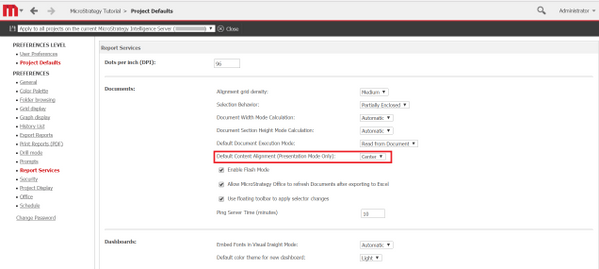
Login to Strategy Web with Administrator account, navigate to Preferences > Project Defaults > Report Services, note the new setting called "Default Content Alignment (Presentation Mode Only)", as shown below:
 

ka04W000000Ofr2QAC_0EM4400000025Ni.jpeg


Comment

0 comments

Details

Knowledge Article

Published:

June 9, 2017

Last Updated:

June 9, 2017