EducationSoftwareStrategy.com
StrategyCommunity

Knowledge Base

Product

Community

Knowledge Base

TopicsBrowse ArticlesDeveloper Zone

Product

Download SoftwareProduct DocumentationSecurity Hub

Education

Tutorial VideosSolution GalleryEducation courses

Community

GuidelinesGrandmastersEvents
x_social-icon_white.svglinkedin_social-icon_white.svg
Strategy logoCommunity

© Strategy Inc. All Rights Reserved.

LegalTerms of UsePrivacy Policy
  1. Home
  2. Topics

The InstallShield Wizard error “An error (-5006 : 0x80070005) has occurred while running the setup” occurs when trying to install MicroStrategy on a Windows machine


Jaime Perez

Vice President, Product Owner • MicroStrategy


Description

This knowledge base article discusses an issue with installing Strategy on a Windows machine on which McAfee Software has been installed.
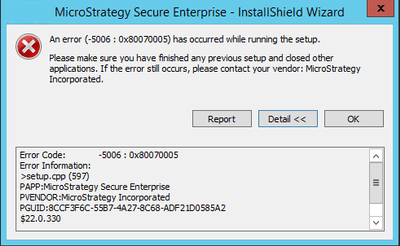
When running Strategy on a Windows machine, the following error occurs a while after executing setup.exe:
 

ka0PW00000014MXYAY_0EM440000002998.jpeg


An error (-5006 : 0x80070005) has occurred while running the setup.

Please make sure you have finished any previous setup and closed other applications. If the error still occurs, please contact your vendor: Strategy Incorporated.

Error Code:   -5006 : 0x80070005
Error Information:
>setup.xpp (597)
PAPP:Strategy Secure Enterprise
PVENDOR:Strategy Incorporated
PGUID:8CCF3F6C-55B7-4A27-8C68-ADF21D0585A2
$22.0.330


Steps to reproduce

  1. On a Windows machine with McAfee®AntiVirus, run the Strategy Installer by running setup.exe file.
  2. The Strategy Secure Enterprise – InstallShield Wizard error will appear.


Why is this happening?

The third-party AntiVirus software McAfee blocks Strategy installation files. 
 

Solution

This is a known issue that has been seen on specific configurations, but a root cause (or a fix) is not available at this time.
To help find a root cause, contact Strategy Technical Support with the following information: 

  1. Verify if an Anti-Virus (AV) scan is being run during installation or if in fact McAfee or a different Anti-Virus is simply running and catching an event that it is blocking.

    Collect the list of events recorded on the AV program and send the logs to us for review. These are stored by default in a location such as this: C\ProgramData\McAfee\EndPoint Security\Logs. It is recommended to send in all the logs generated by the AV software. 
  2. Exact OS version on which the Strategy installation is being attempted.
  3. Strategy Installation Logs (install.log).
  4. Verify if a different version of Strategy was previously installed on this machine.

Option 2

If the organization's Security team allows it, disable McAfee AntiVirus Software temporarily during the installation of Strategy products and then try to enable after a successful installation. This will help to avoid all errors and achieve successful installation.
 

Third Party Software Installation Warning

The third-party product(s) discussed in this technical note is manufactured by vendors independent of Strategy. Strategy makes no warranty, express, implied or otherwise, regarding this product, including its performance or reliability.


Comment

0 comments

Details

Knowledge Article

Published:

May 30, 2017

Last Updated:

March 4, 2024